Blog

  • Outbound Calling Efficiency: 10 Strategies for Sales Teams

    Outbound Calling Efficiency: 10 Strategies for Sales Teams

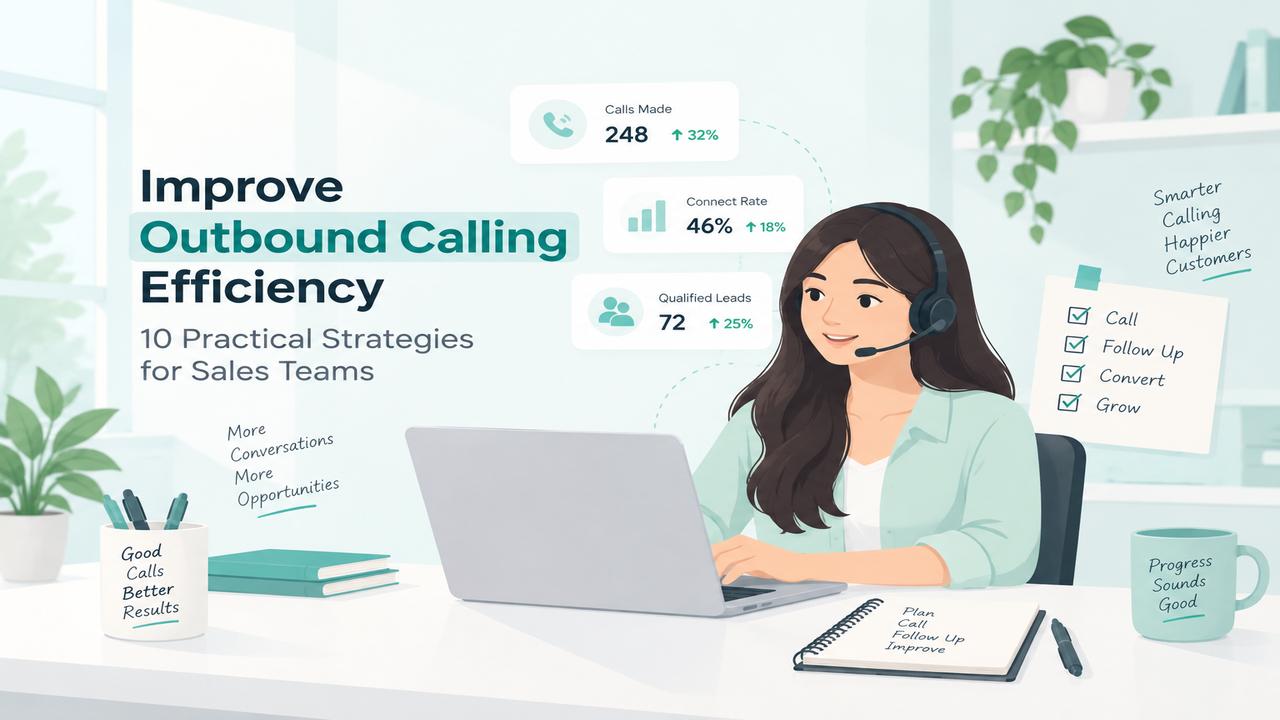
    Outbound calling efficiency is important for sales teams that want to reach more prospects without wasting time on repetitive tasks. Inefficient calling workflows can slow teams down and reduce productivity. From manual dialing and repetitive data entry to inconsistent follow-ups, small inefficiencies can add up quickly.

    Improving outbound calling efficiency helps sales teams spend less time on administrative tasks and more time having meaningful conversations with prospects. In this guide, we’ll cover 10 practical strategies to help sales teams streamline their calling process, improve productivity, and make every calling session more effective.

    10 Strategies to Improve Outbound Calling Efficiency

    1. Use Faster Dialing Methods

    Manual dialing can take up a significant amount of a sales representative’s time, especially when making a large number of outbound calls. Using faster dialing methods can reduce the time spent entering phone numbers and moving between contacts.

    A streamlined dialing process allows sales representatives to move from one prospect to the next more quickly, giving them more time to focus on actual conversations rather than repetitive dialing tasks.

    2. Organize Calls Into Campaigns

    Grouping prospects into focused calling campaigns can help sales teams keep their outreach organized and maintain a consistent calling workflow.

    Instead of selecting contacts individually, teams can organize leads based on factors such as customer segment, sales stage, location, or campaign. This makes it easier for representatives to work through relevant prospects systematically and avoid missing important follow-ups.

    3. Prioritize High-Value Leads

    Not every prospect has the same level of potential. Prioritizing leads based on factors such as lead quality, buying intent, industry, deal size, or sales stage can help representatives focus their calling time on prospects that are more likely to convert.

    A clear lead-prioritization process also helps sales teams avoid spending too much time on low-priority contacts while important opportunities wait for follow-up.

    4. Keep Customer Information Accessible

    Sales representatives need quick access to relevant customer information during an outbound call. Having contact details, previous interactions, notes, and other important information available in one place can reduce time spent switching between different tools.

    Keeping customer information accessible helps representatives prepare for conversations faster and have more informed discussions with prospects.

    5. Automate Call Notes

    Taking notes after every call can become repetitive and time-consuming, especially for sales teams handling a high volume of calls. Automating call notes can reduce manual work and help representatives keep important conversation details organized.

    With call notes handled more efficiently, sales representatives can spend less time on post-call administration and move more quickly to their next conversation.

    6. Reduce Time Between Calls

    Long gaps between calls can reduce the number of prospects a sales representative can reach during a calling session. Streamlining tasks such as finding the next contact, dialing the number, and updating call information can help keep the workflow moving.

    A faster transition between calls allows representatives to maintain momentum and spend more of their working time on actual conversations.

    7. Use SMS for Follow-Ups

    Not every prospect will be ready to continue a conversation immediately after a call. Using SMS for follow-ups can help sales teams stay connected with prospects without relying entirely on another phone call.

    A short message after a call can be used to share additional information, confirm the next step, or remind prospects about a scheduled follow-up. This can make the overall outreach process more consistent and help sales representatives maintain communication between calls.

    8. Track Call Performance

    Tracking outbound calling performance helps sales teams understand what is working and where the calling process can be improved. Metrics such as calls made, answered calls, missed calls, call duration, and conversion rates can provide useful insights into team performance.

    Regularly reviewing these metrics allows managers to identify inefficient workflows, understand agent performance, and make data-driven improvements to their outbound calling strategy.

    9. Improve Agent Availability

    Calls can be missed when sales representatives are unavailable or when incoming and outgoing calling activities are not properly coordinated. Monitoring agent availability helps teams understand who is available to handle calls and distribute calling tasks more effectively.

    Sales teams can also use availability-based workflows to reduce delays and ensure that calling activity is directed toward available representatives. This helps maintain a smoother calling process and reduces wasted time.

    10. Review and Optimize Calling Workflows

    Outbound calling efficiency can improve over time when sales teams regularly review their calling workflows and identify areas that slow down productivity.

    Review factors such as dialing time, follow-up processes, agent activity, call outcomes, and performance metrics to find opportunities for improvement. Updating calling workflows based on these insights can help teams stay efficient as their sales processes and customer needs change.

    Common Outbound Calling Challenges

    Even with a structured process, sales teams can face challenges that affect outbound calling efficiency. Common issues include:

    • Manual dialing: Entering phone numbers one by one can slow down calling sessions.
    • Repetitive administrative work: Updating records and writing notes after every call can take valuable time.
    • Inconsistent follow-ups: Without an organized workflow, important prospects may not receive timely follow-ups.
    • Limited performance visibility: Teams may struggle to identify which calling activities are producing the best results.
    • Disconnected tools: Switching between calling, CRM, messaging, and other tools can interrupt the sales workflow.

    How DialNext Helps Improve Outbound Calling Efficiency

    DialNext brings calling, messaging, and workflow tools together to help sales teams manage outbound communication more efficiently. Instead of relying on separate tools for different parts of the calling process, teams can streamline everyday tasks and keep their calling workflow organized.

    With DialNext, sales teams can:

    • Make calls faster with streamlined dialing workflows.
    • Manage calling campaigns and organize outbound outreach.
    • Keep customer information accessible through CRM integrations.
    • Automate call notes to reduce post-call administrative work.
    • Follow up through SMS when a phone call is not enough.
    • Monitor calling activity and performance using analytics.
    • Manage agent availability to keep calling workflows efficient.

    By reducing repetitive work and bringing key calling activities into one workflow, DialNext helps sales teams spend more time on conversations and less time managing the process around them.

    Best Practices for Improving Outbound Calling Efficiency

    • Use a structured calling process: Define clear steps for prospecting, calling, follow-ups, and updating customer information.
    • Keep contact data organized: Make sure representatives have accurate and up-to-date customer information before making calls.
    • Minimize repetitive tasks: Use calling and workflow tools to reduce manual dialing, note-taking, and data entry.
    • Prioritize follow-ups: Track prospects that require another call or message so important opportunities are not overlooked.
    • Review performance regularly: Analyze calling activity and outcomes to identify bottlenecks and improve the workflow over time.

    FAQs

    What is outbound calling efficiency?

    Outbound calling efficiency refers to how effectively a sales team manages outgoing calls while making the most of its time, resources, and available leads.

    How can sales teams improve outbound calling efficiency?

    Sales teams can improve efficiency by using faster dialing methods, organizing calls into campaigns, prioritizing leads, automating repetitive tasks, and regularly reviewing calling performance.

    How does DialNext help sales teams with outbound calling?

    DialNext helps streamline outbound calling with features such as faster dialing workflows, calling campaigns, CRM integrations, automated call notes, SMS, analytics, and agent availability.

    Why is reducing time between calls important?

    Reducing the time spent on repetitive tasks between calls allows sales representatives to spend more of their working time speaking with prospects and completing follow-ups.

    What metrics should sales teams track?

    Teams can track metrics such as calls made, answered calls, missed calls, call duration, follow-up activity, and conversion rates to evaluate and improve calling performance.

    Conclusion

    Improving outbound calling efficiency is not just about making more calls. It is about reducing repetitive tasks, organizing outreach, prioritizing the right prospects, and giving sales representatives the tools they need to have more productive conversations.

    By using a structured calling workflow and regularly reviewing performance, sales teams can improve productivity, maintain consistent follow-ups, and make better use of their calling time. Tools like DialNext can further streamline these workflows by bringing calling, campaigns, CRM integrations, SMS, call notes, analytics, and agent availability into one platform.
  • Call Routing System: What Is It and How Does It Work?

    Call Routing System: What Is It and How Does It Work?

    Call routing is a phone system feature that directs incoming calls to the right person, team, or destination based on predefined rules. It helps businesses manage incoming calls more efficiently, reduce unnecessary transfers, and connect callers with the appropriate agent faster.

    What Is Call Routing?

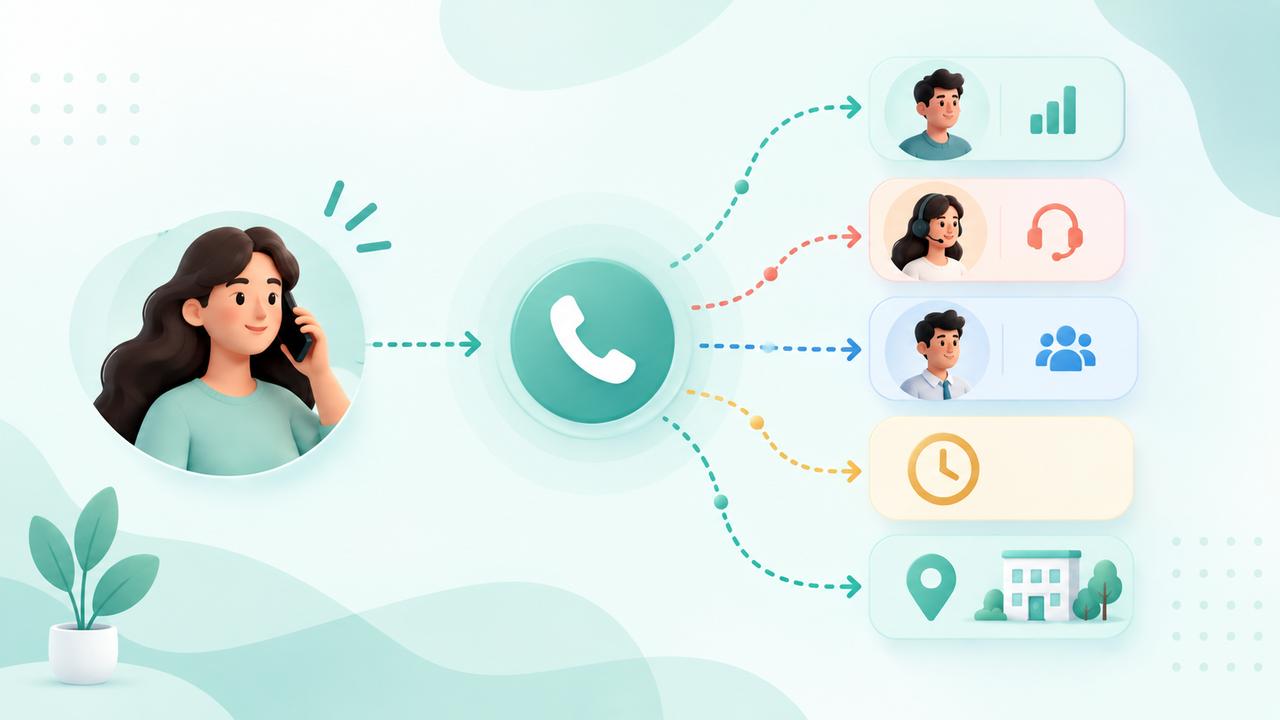
    Call routing is a phone system feature that automatically directs incoming calls to the right person, team, department, or destination based on predefined rules. These rules can consider factors such as the caller’s needs, business hours, agent availability, or the caller’s location.

    Instead of manually transferring every call, businesses can use call routing to create an organized call flow. This helps callers reach the appropriate destination faster and makes it easier for teams to manage incoming calls efficiently.

    For example, a business can route sales calls to the sales team, support calls to customer service, and calls received outside business hours to voicemail or an after-hours team.

    How Does Call Routing Work?

    Call routing works by applying predefined rules to incoming calls and directing each call to the most appropriate person, team, or destination.

    A typical call routing process works like this:

    1. Incoming call: A customer calls the business phone number.
    2. Routing rules are checked: The system evaluates rules such as business hours, agent availability, caller location, or team.
    3. Call is directed: The system sends the call to the appropriate agent, team, queue, or destination.
    4. Fallback routing: If the selected agent is unavailable, the call can be redirected to another agent, voicemail, or a backup destination.

    This process helps businesses handle incoming calls efficiently without requiring someone to manually transfer every call.

    Types of Call Routing

    1. Round-Robin Routing

    Calls are distributed evenly among available agents, giving each agent a turn to handle the next incoming call.

    2. Sequential Routing

    The system tries agents in a specific order. If the first agent does not answer, the call moves to the next available agent.

    3. Skills-Based Routing

    Calls are directed to agents based on their skills, expertise, or department, helping callers reach the most suitable person.

    4. Time-Based Routing

    Calls are routed differently depending on the time of day and business hours. For example, calls outside working hours can be sent to voicemail or an after-hours team.

    5. Location-Based Routing

    Calls are routed based on the caller’s location or region. This can help businesses connect customers with the appropriate local team or office.

    Benefits of Call Routing

    Call routing helps businesses manage incoming calls more efficiently and create a better experience for callers. Key benefits include:

    • Faster call handling: Connect callers with the right person or team without unnecessary transfers.
    • Better agent efficiency: Distribute calls based on agent availability, skills, or other routing rules.
    • Fewer missed calls: Route unanswered calls to another agent, team, or backup destination.
    • Improved customer experience: Help callers reach the appropriate department faster.
    • Flexible call management: Adjust routing rules for business hours, holidays, locations, and changing team availability.

    Common Business Use Cases

    • Sales teams: Route new customer inquiries directly to sales representatives.
    • Customer support: Send support calls to the appropriate support team or queue.
    • Remote teams: Connect callers with available employees regardless of their location.
    • After-hours calls: Route calls received outside business hours to voicemail, an on-call team, or another destination.
    • Multi-location businesses: Direct callers to the appropriate office or regional team based on routing rules.

    Call Routing vs IVR

    Call routing and Interactive Voice Response (IVR) are related phone system features, but they serve different purposes.

    IVR interacts with callers by providing voice prompts and allowing them to select options, such as pressing a number to choose Sales or Support. Call routing determines where the call should go based on predefined rules such as department, agent availability, business hours, or caller information.

    For example, an IVR can ask a caller to “Press 1 for Sales or 2 for Support,” while call routing sends the caller to the appropriate team after the selection is made.

    Businesses can use both features together to create an organized and efficient incoming call flow.

    Call Routing vs Call Queues

    Call routing determines where an incoming call should be sent, while a call queue manages callers waiting to speak with an available agent.

    For example, call routing can direct a customer to the Support team, while the call queue can place the customer in a waiting line until a support agent becomes available.

    Businesses often use both together to manage incoming calls efficiently and reduce missed calls.

    Common Call Routing Problems

    • Incorrect routing rules: Calls may reach the wrong team or agent if routing rules are not configured correctly.
    • Uneven call distribution: Some agents may receive more calls than others, affecting response times and workload.
    • Missed calls: Calls can be missed when agents are unavailable and no backup routing is configured.
    • Complex call flows: Too many routing conditions can make the call flow difficult to manage and maintain.
    • Outdated routing settings: Changes in team availability, working hours, or business structure can make existing routing rules ineffective.

    Call Routing Best Practices

    • Keep routing rules simple: Use clear and straightforward rules that are easy to manage and update.
    • Route calls based on agent availability: Send calls only to available agents whenever possible.
    • Set up fallback options: Configure voicemail, backup teams, or alternate numbers for unanswered calls.
    • Review routing rules regularly: Update rules when business hours, team structure, or agent availability changes.
    • Test call flows: Regularly test different scenarios to make sure calls reach the correct destination.

    How to Set Up a Call Routing System

    Setting up a call routing system involves defining how incoming calls should be handled and where they should be directed.

    1. Define your call flow: Decide how incoming calls should move through your phone system.
    2. Choose routing rules: Set rules based on factors such as agent availability, business hours, department, or location.
    3. Assign call destinations: Select the appropriate agents, teams, queues, or external numbers for each rule.
    4. Set up fallback options: Configure voicemail or alternate destinations for calls that cannot be answered.
    5. Test the call flow: Make test calls to confirm that each routing rule works as expected.
    6. Monitor and update: Review call performance and adjust routing rules as your business needs change.

    When Should a Business Use Call Routing?

    Call routing is useful for businesses that receive a high volume of incoming calls or need to connect callers with specific teams or agents.

    Businesses should consider call routing when they:

    • Receive calls for multiple departments, such as Sales and Support.
    • Have remote or distributed teams handling customer calls.
    • Need to manage calls outside regular business hours.
    • Want to reduce missed calls and unnecessary transfers.
    • Need to route calls based on agent availability, location, or specific business rules.

    A well-configured call routing system can make incoming call management more organized and help businesses provide a faster, more consistent caller experience.

    FAQs

    What is call routing?

    Call routing is a phone system feature that directs incoming calls to the appropriate person, team, department, or destination based on predefined rules.

    How does call routing work?

    Call routing uses configured rules such as agent availability, business hours, location, or department to determine where an incoming call should be sent.

    What is the difference between call routing and IVR?

    IVR interacts with callers through voice prompts and menu options, while call routing determines where the call should be directed based on predefined rules.

    Can call routing reduce missed calls?

    Yes. Businesses can configure fallback options such as another agent, team, external number, or voicemail when the primary destination is unavailable.

    Can call routing work outside business hours?

    Yes. Time-based routing can direct after-hours calls to voicemail, an on-call team, or another designated destination.

    Is call routing useful for remote teams?

    Yes. Call routing can direct incoming calls to available agents regardless of their physical location, making it useful for remote and distributed teams.

    Conclusion

    Call routing helps businesses manage incoming calls by directing callers to the right person, team, or destination based on predefined rules. With the right routing strategy, businesses can reduce missed calls, improve agent efficiency, and provide a smoother caller experience.

    As business needs change, regularly reviewing and updating routing rules can help keep the call flow efficient and reliable.

  • What Is IVR? How Does Interactive Voice Response Work?

    What Is IVR? How Does Interactive Voice Response Work?

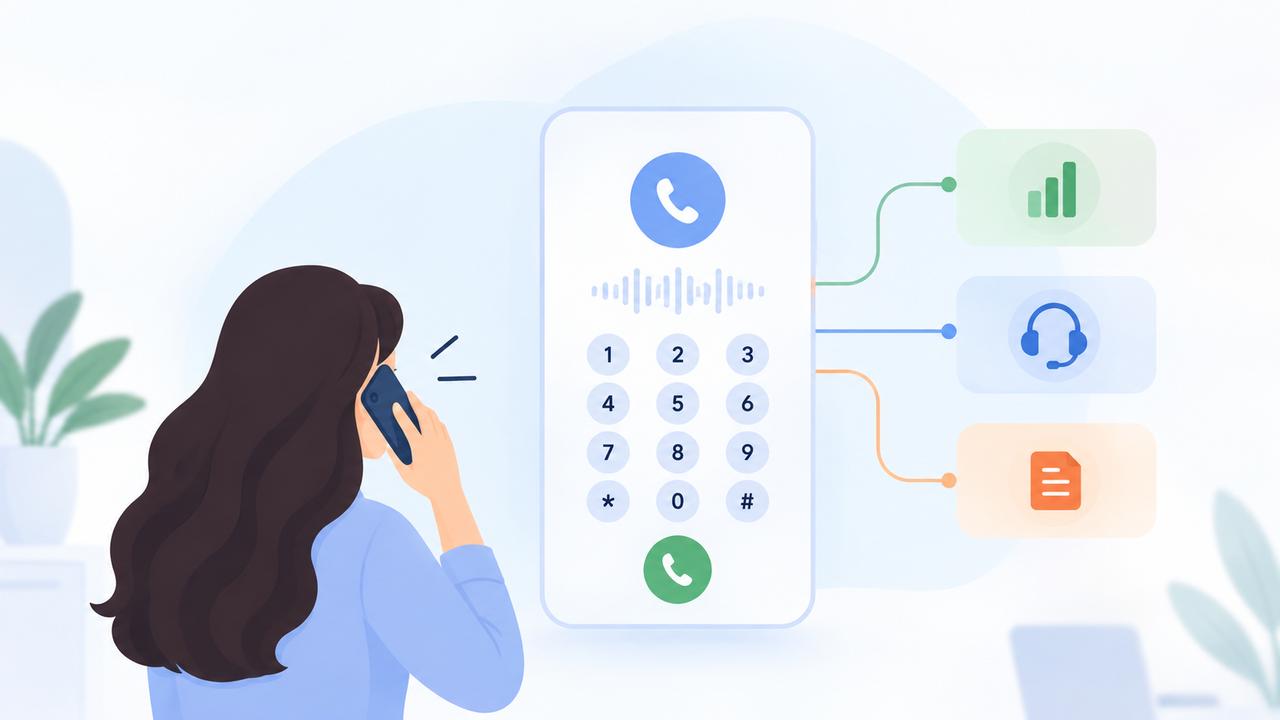
    Interactive Voice Response (IVR) is an automated phone technology that lets callers interact with a business using keypad selections or spoken responses. It helps businesses manage incoming calls, understand customer needs, and connect callers with the right team.

    For example, when you call a company and hear, “Press 1 for Sales, Press 2 for Support, or Press 3 for Billing,” you are using an IVR system.

    Instead of sending every caller to the same person, businesses can use automated menus to organize calls. As a result, customers can reach the right department more easily.

    In this guide, we’ll explain what IVR is, how it works, its main types, benefits, common use cases, and best practices.

    What Is IVR?

    Interactive Voice Response (IVR) is a phone system technology that allows callers to interact with automated prompts using their phone keypad or, where supported, their voice.

    The system presents callers with a set of options and uses their responses to determine the next step.

    For example:

    Incoming call → Greeting → Caller selects Support → Call routed to Support team

    Depending on the configuration, an IVR can do more than route calls. It can help collect information, provide automated instructions, handle simple requests, and connect callers with the appropriate agent or queue.

    This makes it particularly useful for businesses that receive calls from customers, prospects, partners, or other external contacts and need a consistent way to manage those conversations.

    How Does an IVR System Work?

    An IVR system follows a set call flow to understand what the caller needs. It then uses the caller’s input to determine the next step.

    Although every setup can be different, a typical call follows these steps:

    1. First, the caller dials the business number
    The call reaches the business phone system, which activates the configured call flow.

    2. Next, an automated greeting plays
    The caller hears a welcome message and instructions, such as which number to press for different departments.

    3. After that, the caller provides an input
    The caller can select an option using the phone keypad (DTMF) or, where supported, by speaking their response.

    4. The system then processes the selection
    It matches the caller’s input with the configured call flow and determines the appropriate destination.

    5. Based on the response, the call is routed
    The call can then be sent to a specific team, agent, queue, or another destination.

    6. Finally, the caller reaches the appropriate destination
    The call connects to the selected destination, helping the caller reach the right person without manual transfers.

    Different Types of Interactive Voice Response

    Businesses can configure automated phone menus in different ways depending on their customer communication needs.

    1. Menu-Based IVR

    This is the traditional approach where callers choose from predefined options.

    For example:

    • Press 1 for Sales
    • Press 2 for Support
    • Press 3 for Billing

    It works well when a business has clearly defined departments or call reasons.

    2. Self-Service IVR

    Self-service flows allow callers to complete simple tasks without speaking with an agent.

    Depending on the system, this could include providing information, confirming details, or following automated instructions.

    Self-service can reduce unnecessary agent involvement when the caller’s request does not require human assistance.

    3. Call Routing IVR

    Here, the caller’s selection determines where the call should go.

    For example:

    Press 1 → Sales team
    Press 2 → Customer Support
    Press 3 → Accounts

    This is useful for organizations with multiple teams handling inbound communication.

    4. Hybrid IVR

    A hybrid approach combines automation with human assistance.

    The automated flow can handle simple interactions first and transfer the caller to an agent when additional help is required.

    The best approach depends on the business’s call volume, team structure, customer expectations, and the complexity of its workflows.

    Benefits of Using IVR for Business Calls

    A well-designed IVR can make incoming calls easier to manage. It can also improve the experience for customers and employees.

    Here are some of the main benefits:

    1. Faster Call Routing

    Callers can select the department they need instead of waiting for an employee to manually redirect them.

    2. Better Customer Experience

    Clear instructions give callers a predictable path and make it easier to find the right team.

    3. Less Manual Call Handling

    The initial interaction and routing process can happen automatically, reducing repetitive work for employees.

    4. Consistent Call Management

    Businesses can provide a consistent experience to callers throughout the day. This also reduces the need for employees to manage every incoming call manually.

    5. Easier High-Volume Call Management

    When several customers call at the same time, automated menus can help organize traffic before calls reach agents or queues.

    6. Better Use of Agent Time

    Agents can spend more time handling conversations that require human assistance instead of repeatedly answering calls only to transfer them elsewhere.

    7. More Structured Business-Hour Handling

    Different call flows can be configured for working hours, after-hours, weekends, or holidays, depending on the phone system.

    Common Business Use Cases

    Automated call flows are useful anywhere a business needs to organize inbound conversations.

    Sales

    Route prospects directly to the sales team based on the option they select.

    Customer Support

    Send callers to the appropriate support team instead of making them explain their issue to the wrong department first.

    Billing and Accounts

    Create a dedicated path for billing, payment, or account-related questions.

    Appointments and Service Requests

    Help customers reach the team responsible for scheduling or service-related requests.

    Multi-Department Organizations

    Companies with Sales, Support, Billing, Operations, and other teams can create separate paths for each department.

    High-Volume Inbound Calls

    Organizations that receive many calls at the same time can combine automated menus with queues and routing rules. This makes incoming call traffic easier to manage.

    IVR vs. Call Routing: What’s the Difference?

    IVR and call routing are closely connected, but they perform different jobs.

    IVR interacts with the caller and collects their input.

    Call routing determines where the call should go.

    For example:

    Customer calls → Automated greeting → “Press 1 for Sales” → Caller presses 1 → Routing sends the call to Sales

    In this example, the voice menu collects the caller’s choice, while the routing logic determines the destination.

    A simple way to remember the difference is:

    IVR = What does the caller need?
    Call routing = Where should the caller go?

    IVR vs. AI Voice Agents: What’s the Difference?

    Traditional automated menus and AI voice agents can both automate phone interactions, but they are designed for different types of conversations.

    Traditional IVR

    A traditional setup generally follows a predefined call flow. Callers choose from available options, and the system follows the configured path.

    For example:

    “Press 1 for Sales. Press 2 for Support. Press 3 for Billing.”

    This approach works well when a business needs simple and predictable call routing.

    AI Voice Agents

    AI voice agents are designed for more conversational interactions. Instead of requiring callers to choose from a fixed menu, they can understand spoken requests and respond based on the configured workflow.

    For example:

    AI voice agent:
    “How can I help you today?”

    Caller:
    “I need to reschedule my appointment.”

    The conversation can then continue based on the caller’s request, depending on the available workflow and integrations.

    Can They Work Together?

    Yes. Businesses can combine both technologies to create a more flexible calling experience.

    For example, an automated menu can handle the initial call routing, while an AI voice agent can manage more conversational requests. A human agent can also take over when the caller needs personal assistance.

    Ultimately, the right approach depends on the business’s needs. IVR is well suited to simple, predictable routing, while AI voice agents are better suited to flexible and conversational interactions.

    Common Problems With Automated Call Menus

    Automation can improve call management. However, a poorly designed menu can make the customer experience worse.

    The most common problems include:

    1. Too Many Options

    Long menus can overwhelm callers and make it difficult to find the right choice.

    2. Too Many Menu Levels

    Forcing callers through several layers before they reach an agent can increase frustration and unnecessary call abandonment.

    3. Unclear Instructions

    Prompts should clearly explain what each option does. Long or confusing messages can cause callers to select the wrong option.

    4. No Clear Human-Agent Option

    Some customers need to speak with a person. A well-designed flow should provide a reasonable path to human assistance when automation cannot solve the request.

    5. Incorrect Routing

    If routing rules are outdated or incorrectly configured, callers may end up with the wrong department or an unavailable team.

    6. Outdated Information

    Business hours, department names, and other recorded information should be reviewed regularly.

    The purpose of automation should be to make the caller’s journey shorter and clearer, not to create more steps.

    IVR Best Practices for Businesses

    A good IVR should help callers reach the right destination quickly. Therefore, the menu should be simple, clear, and easy to follow.

    Keep these best practices in mind when creating your call flow:

    1. Keep Menus Simple

    Include only the options callers actually need.

    Avoid creating a separate menu option for every possible request.

    2. Use Short, Clear Prompts

    Tell callers exactly what each option does.

    Avoid unnecessary explanations before presenting the choices.

    3. Put Common Options First

    Place frequently selected options where callers can access them quickly.

    4. Provide a Path to a Human Agent

    Not every issue can be handled through automation. Make it easy for callers to reach an employee when necessary.

    5. Plan for Business Hours

    Your call flow should account for working hours, after-hours periods, weekends, and holidays where relevant.

    6. Configure Fallback Paths

    Decide what should happen if:

    • The caller does not select an option
    • The selected team is unavailable
    • The caller chooses an invalid option
    • The queue reaches its limit

    7. Test the Complete Flow

    Call the number yourself and test every available path.

    Don’t test only the successful path. Also check incorrect inputs, no response, unavailable agents, and after-hours behavior.

    8. Review the Flow Regularly

    Departments, teams, business hours, and customer needs change over time. Update your call flow whenever the underlying business process changes.

    How Does IVR Fit Into a Business Phone System?

    An automated voice menu is usually one part of a larger business phone system.

    A typical inbound call flow can look like this:

    Incoming Call → IVR → Call Routing → Ring Group or Queue → Agent

    Each component has a different role.

    • IVR collects the caller’s choice.
    • Call routing determines the destination.
    • Ring groups can distribute calls among selected agents.
    • Queues can hold callers when agents are busy.
    • Business-hour rules can determine what happens during and outside working hours.
    • Caller identification can provide information about the incoming caller.
    • CRM integrations can connect call activity with customer records, depending on the platform.

    Together, these features create a more structured way to manage inbound customer communication.

    How to Create an Effective IVR Call Flow

    Creating an effective IVR starts with understanding why customers call your business. Next, group those requests into a simple and logical call flow.

    Follow these steps:

    Step 1: Identify Common Call Reasons

    List the most frequent reasons customers contact you.

    For example:

    • Sales inquiries
    • Technical support
    • Billing questions
    • Appointments
    • General information

    Step 2: Group Similar Requests

    Avoid creating a separate option for every small request.

    Group related questions under the department or service that handles them.

    Step 3: Define Where Each Call Should Go

    Decide which team, agent, ring group, or queue should handle each category.

    Step 4: Create Fallback Paths

    Determine what happens when the preferred destination is unavailable.

    For example:

    Sales team unavailable → Sales queue → Voicemail or fallback destination

    Step 5: Write the Prompts

    Keep the greeting and menu instructions short.

    For example:

    “Press 1 for Sales, 2 for Support, or 3 for Billing.”

    Step 6: Test the following scenarios:

    • Correct selections
    • Incorrect selections
    • No input
    • Unavailable agents
    • Busy queues
    • After-hours calls

    Step 7: Review and Improve

    Monitor how the call flow performs and make changes when customer needs or internal processes change.

    The best call flow is not necessarily the most complex one. It is the one that helps callers reach the right destination with the fewest unnecessary steps.

    When Should a Business Use IVR?

    IVR can be useful for businesses that receive regular incoming calls. It is especially helpful when different teams handle different types of requests.

    A business may benefit from IVR when:

    • Customers frequently contact different departments.
    • Your team receives enough calls that manual transfers become inefficient.
    • Sales, Support, Billing, or other teams handle different types of calls.
    • You need different call behavior during and outside business hours.
    • Multiple agents handle incoming calls.
    • You want to reduce unnecessary transfers.
    • Call queues and routing rules are an important part of your workflow.

    However, not every business needs an elaborate setup.

    If a small team receives a limited number of calls and the same person handles most inquiries, a complex menu may add unnecessary friction.

    Use automation when it makes the customer journey simpler—not simply because the feature is available.

    Frequently Asked Questions About IVR

    What does IVR stand for?

    IVR stands for Interactive Voice Response. It is a phone technology that allows callers to interact with automated prompts using keypad inputs or supported voice responses.

    What is the main purpose of IVR?

    The main purpose is to organize inbound calls and guide callers to the appropriate department, agent, queue, or service.

    Can IVR route calls to different departments?

    Yes. A business can configure different options for departments such as Sales, Support, Billing, or Operations and route callers based on their selection.

    Is IVR the same as an auto attendant?

    The terms are sometimes used interchangeably, but they can describe slightly different capabilities.

    An auto attendant primarily provides a menu and directs callers to the appropriate destination. IVR can include similar routing functionality while also supporting interactive inputs and, depending on the system, automated self-service workflows.

    Can IVR work with AI voice agents?

    Yes. Businesses can combine structured automated routing with AI voice agents.

    For example, an automated menu can handle the initial routing, while an AI voice agent can handle a more conversational interaction afterward.

    Does IVR work only with keypad inputs?

    No. Many systems support keypad inputs, while some also support spoken responses. The available input methods depend on the phone platform and configuration.

    Conclusion

    IVR gives businesses a structured way to manage inbound calls. It can help callers reach the right department faster while reducing repetitive manual transfers for employees.

    The most effective setup is usually a simple one: clear options, short prompts, accurate routing, useful fallback paths, and an easy way to reach human assistance when needed.

    When combined with features such as call routing, queues, ring groups, business-hour rules, caller identification, and CRM integrations, an automated voice menu can become an important part of a modern business phone system.

    The goal isn’t to automate every conversation. The goal is to make every incoming call easier to manage—for both the customer and the business.

  • DialNext Gorgias Integration: Connect Gorgias with DialNext

    DialNext Gorgias Integration: Connect Gorgias with DialNext

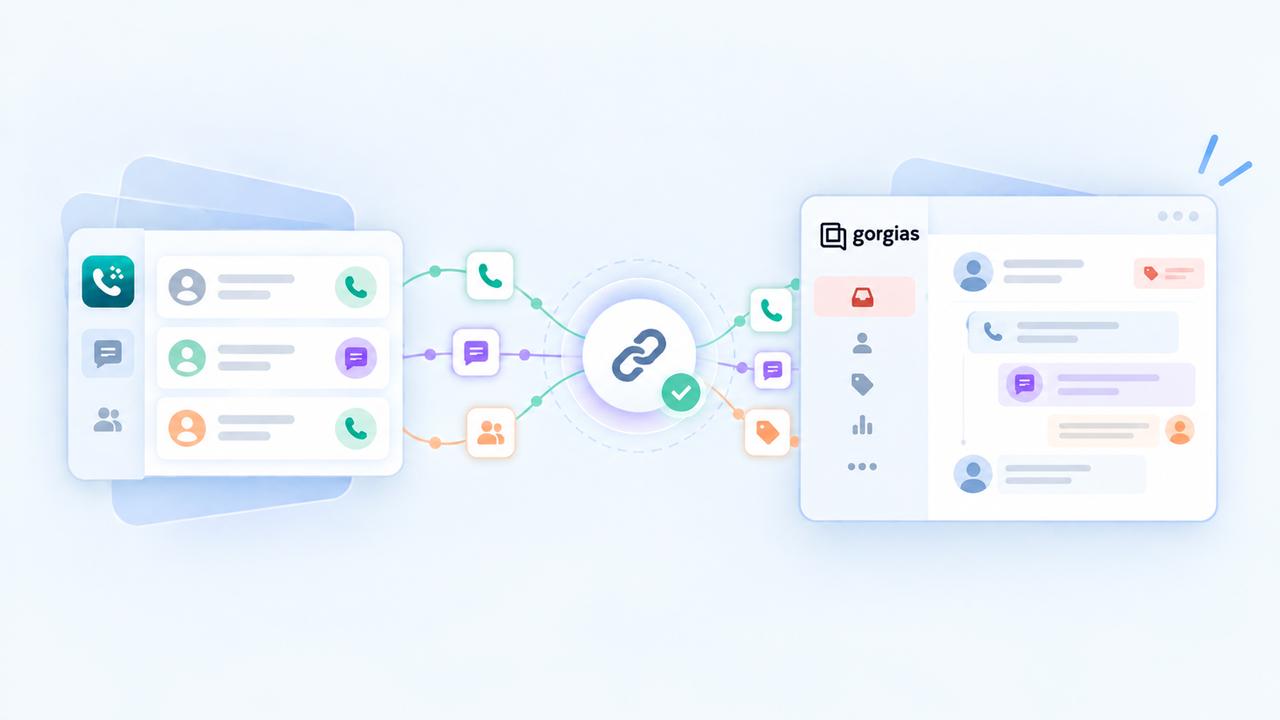
    DialNext Gorgias integration lets you connect your DialNext account with Gorgias and log call and SMS activity directly as tickets in Gorgias. Follow the steps below to complete the integration and keep your customer communication organized.

    How to integrate DialNext with Gorgias

    1. Log in or sign up to your DialNext account.
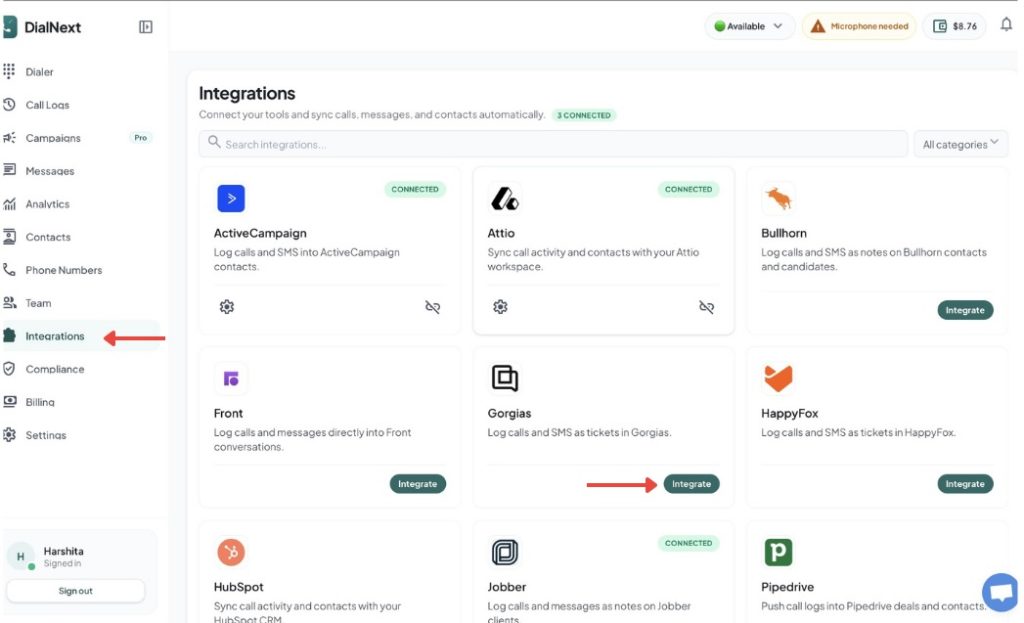
    2. In the left sidebar, click Integrations.
    3. Find Gorgias in the integrations list and click Integrate.

    4. Authorize the connection between DialNext and Gorgias.

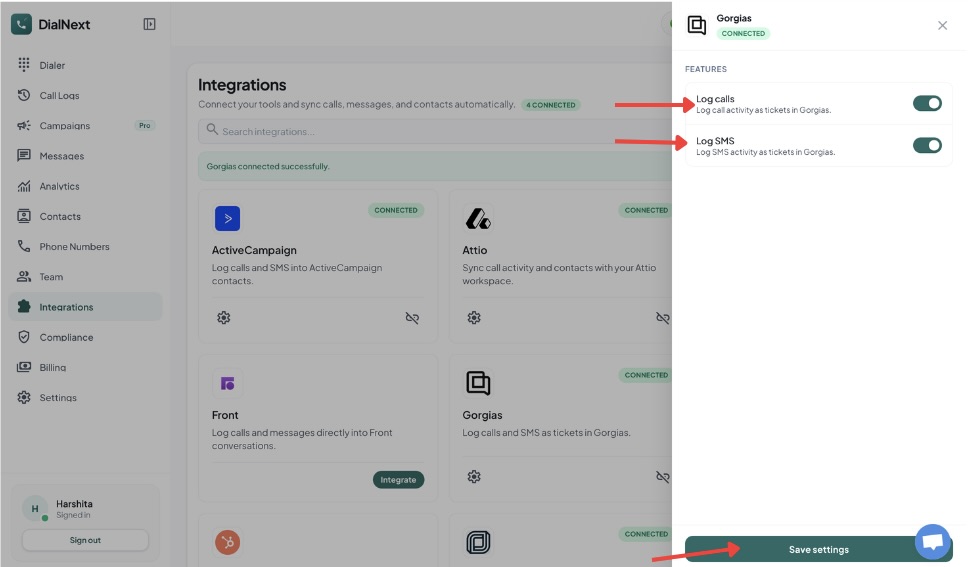
    5. Choose the features you want to enable.

    6. Click Save settings to complete the integration.

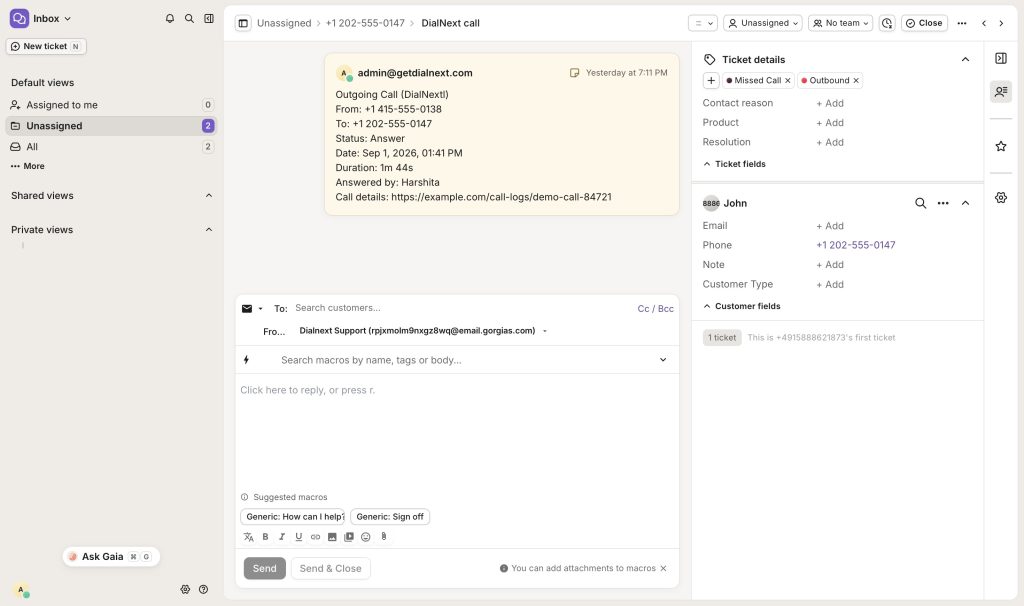
    7. Make a test call or send an SMS from DialNext to verify that the activity is logged in Gorgias.

    Your DialNext account is now successfully connected to Gorgias.

    What does the DialNext Gorgias integration do?

    The DialNext Gorgias integration connects your DialNext account with Gorgias so your team can manage customer communication in one place. Once connected, DialNext can log call and SMS activity directly in Gorgias tickets.

    This integration helps support teams keep communication records organized. Instead of manually adding call or SMS details to each ticket, the activity can be recorded automatically. Your team can then review customer interactions while working inside Gorgias.

    You can enable the features that match your workflow and save the integration settings. After setup, make a test call or send an SMS from DialNext to confirm that the activity appears correctly in Gorgias.

    How to use the integration

    After completing the DialNext Gorgias integration, make sure the required features are enabled in the integration settings.

    You can enable call logging and SMS logging based on your workflow. Once the settings are saved, calls and SMS messages made through DialNext can be recorded as tickets in Gorgias.

    If you encounter any issues, you can reach us at help@dialnext.io

  • DialNext Jobber Integration: How to Connect Jobber with DialNext?

    DialNext Jobber Integration: How to Connect Jobber with DialNext?

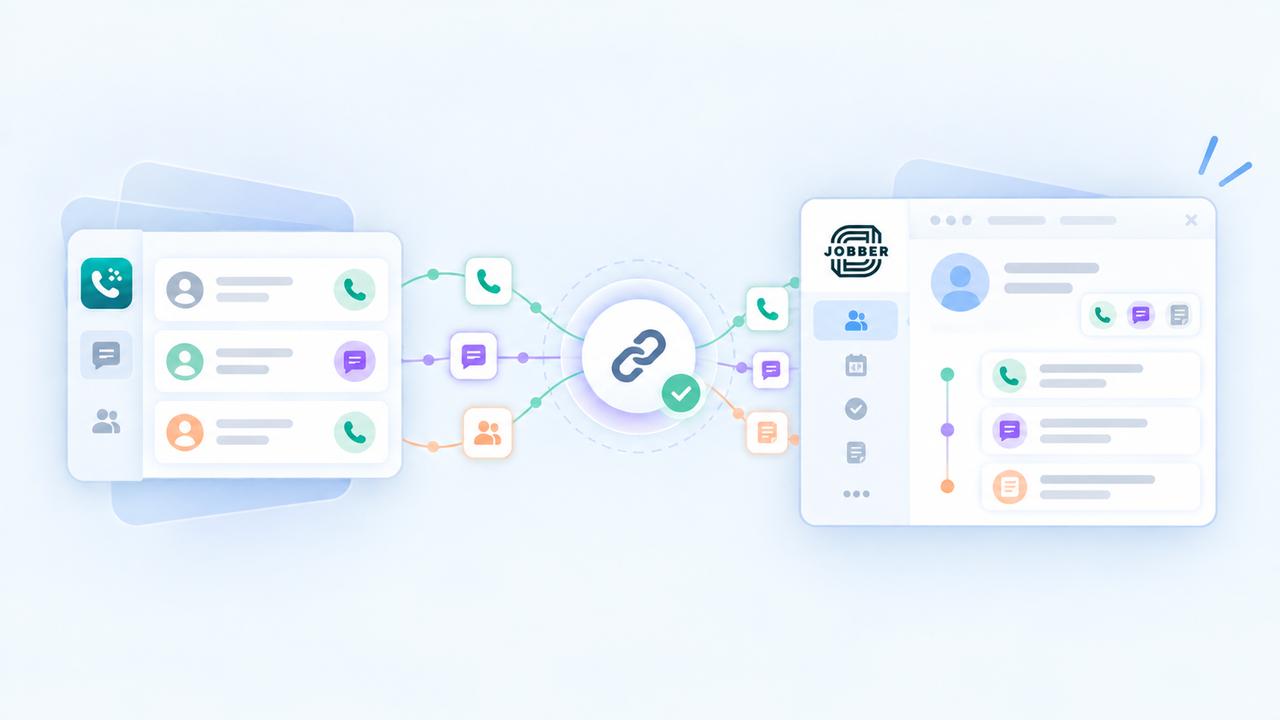
    DialNext Jobber integration lets you connect your DialNext account with Jobber and log call and SMS activity directly as notes on Jobber clients. Follow the steps below to complete the integration quickly and start keeping your client communication organized.

    How to integrate DialNext with Jobber

    1. Log in or sign up to your DialNext account.

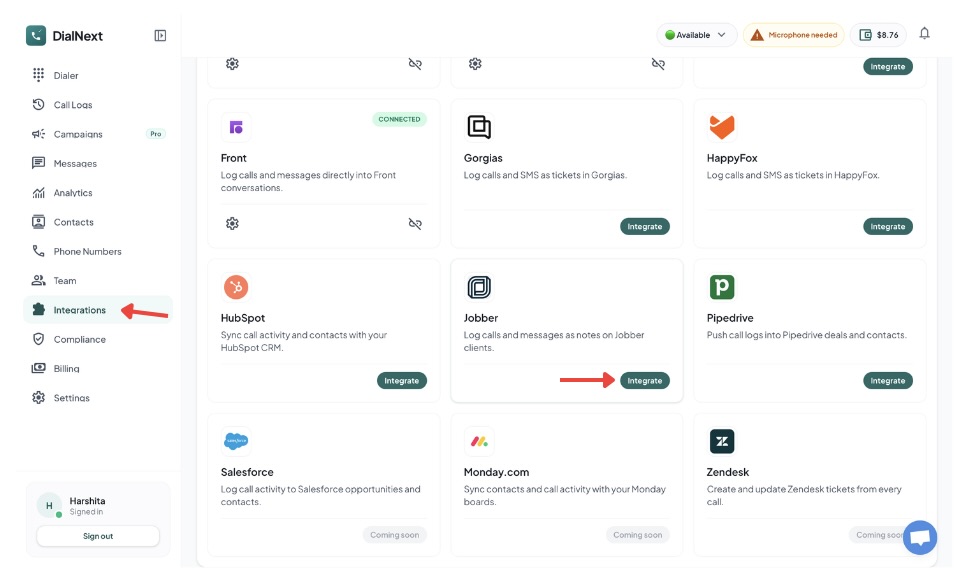
    2. In the left sidebar, click Integrations.

    3. Find Jobber in the integrations list and click Integrate.

    4. Authorize the connection between DialNext and Jobber.

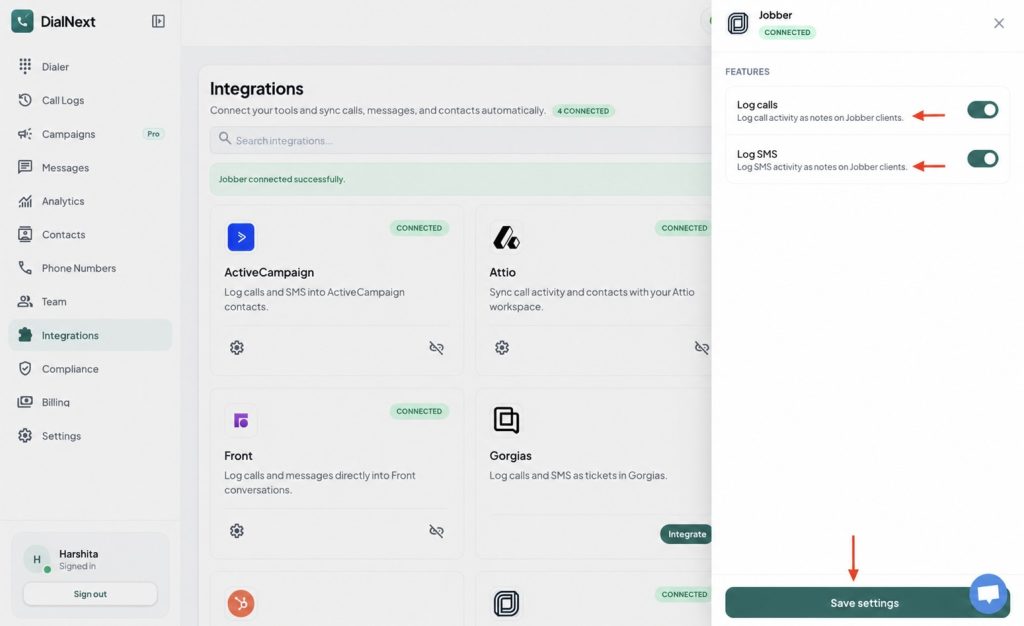
    5. Choose the features you want to enable.

    6. Click Save settings to complete the integration.

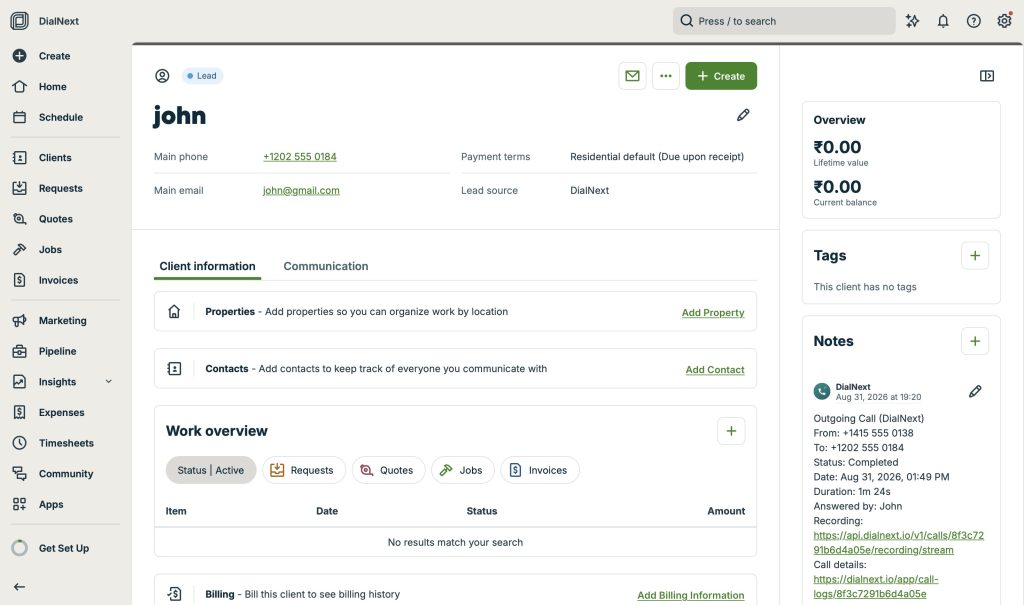
    7. Make a test call or send an SMS from DialNext to verify that the activity is logged in Jobber.

    Your DialNext account is now successfully connected to Jobber.

    What does the DialNext Jobber integration do?

    The DialNext Jobber integration helps you keep your client communication organized by connecting your DialNext account with Jobber. Once connected, call activity and SMS activity can be logged as notes on your Jobber clients. This makes it easier to keep track of customer interactions without manually adding communication details to Jobber.

    How to use the integration

    After completing the DialNext Jobber integration, make sure the required features are enabled in the integration settings. You can enable call logging and SMS logging based on your workflow. Once the settings are saved, your DialNext communication activity can be recorded in Jobber client notes.


    If you encounter any issues, you can reach us at help@dialnext.io

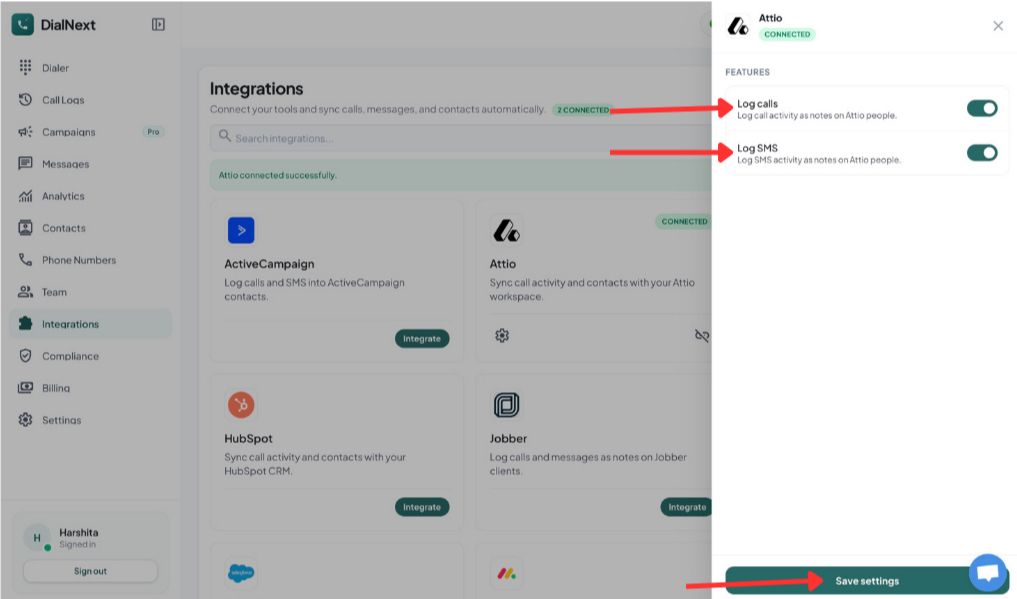
  • How to integrate DialNext with Attio?

    How to integrate DialNext with Attio?

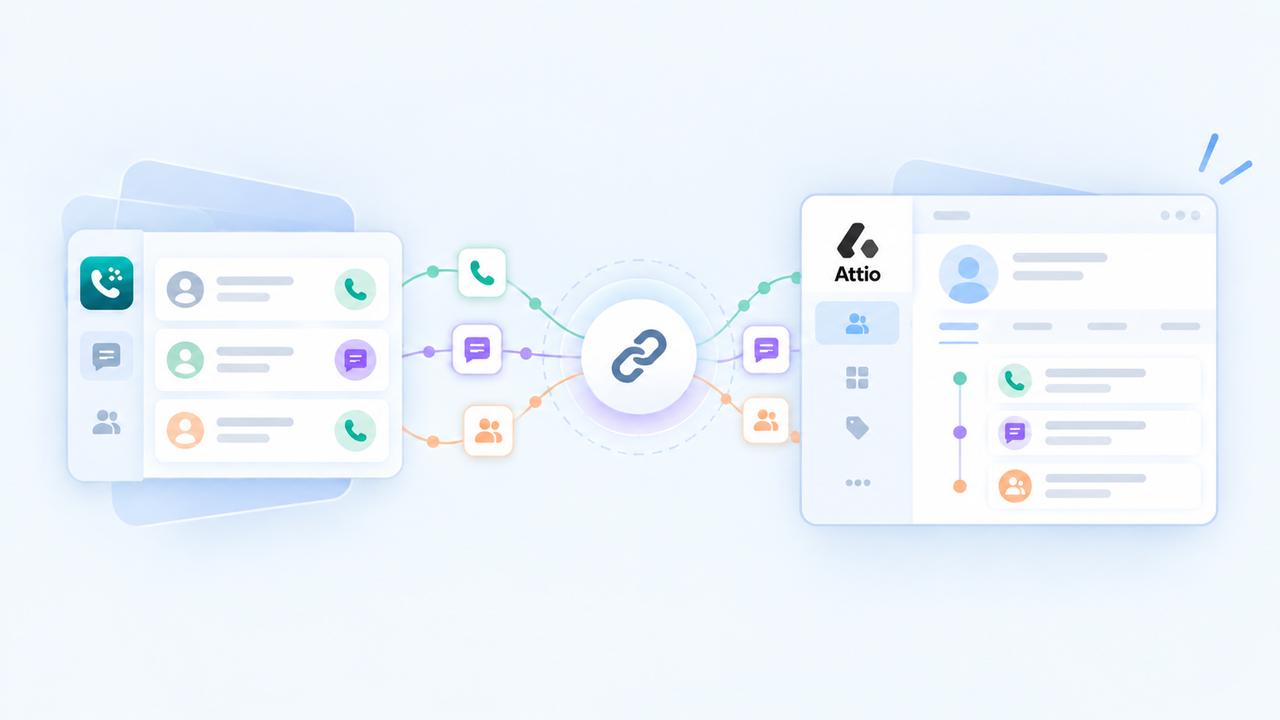
    Integrate DialNext with Attio in a few simple steps.

    How to integrate DialNext with Attio

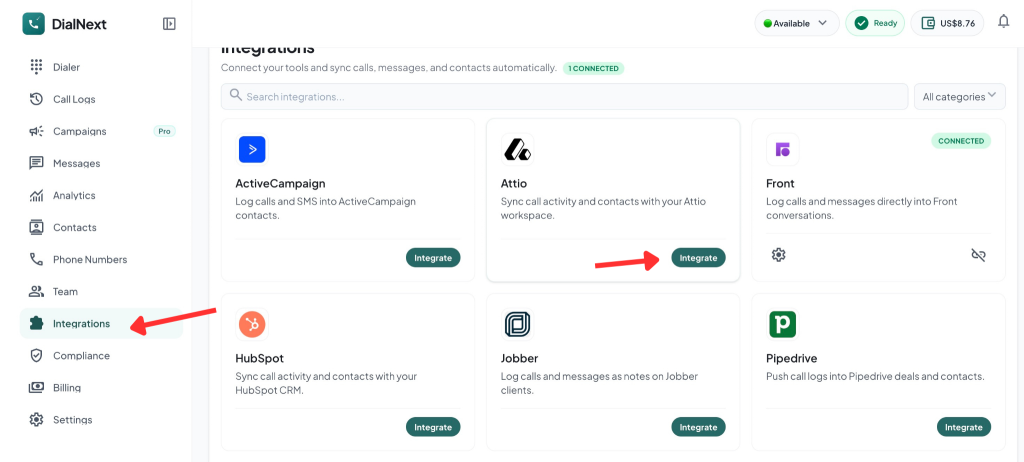
    1. Log in or sign up to your DialNext account.
    2. In the left sidebar, click Integrations.
    3. Find Attio in the integrations list and click Integrate.

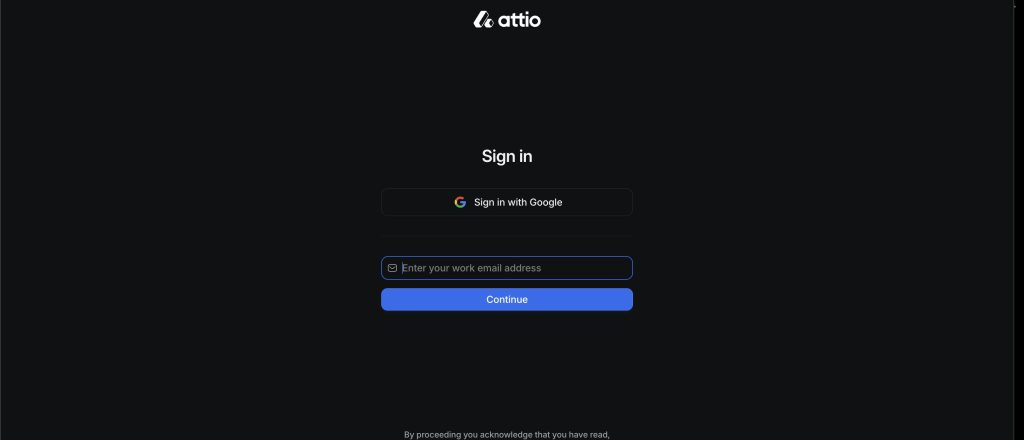
    4. Sign in to your Attio account using your work email or Google.

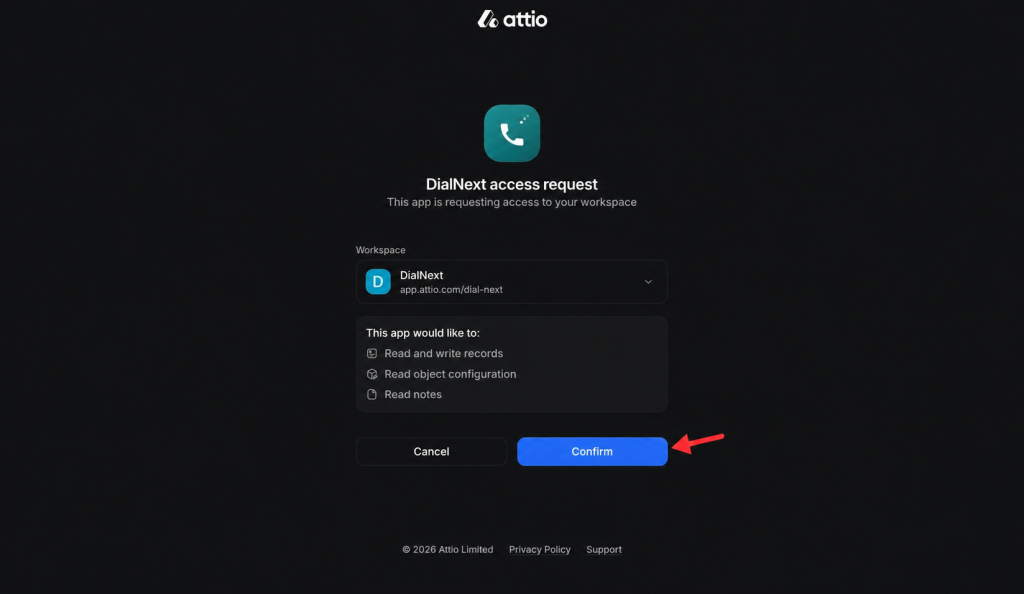
    5. Select your DialNext workspace and click Confirm to Authorize the connection.

    6.Choose the features you want to enable, then click Save settings.

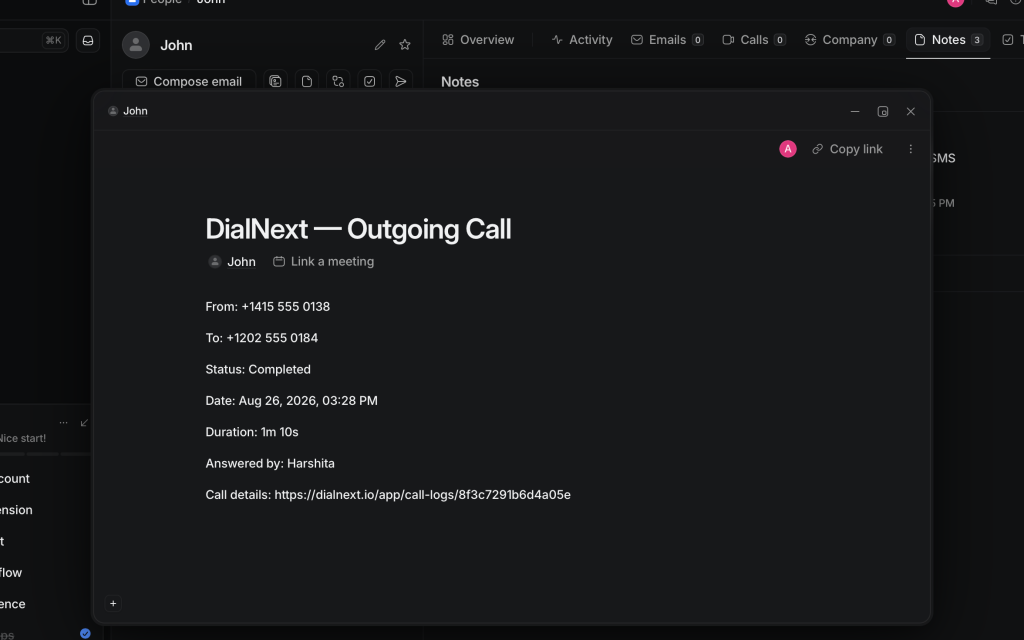
    7. Make a test call or send an SMS from DialNext to verify that the activity is logged in Attio.

    Your DialNext account is now successfully connected to Attio.

    If you encounter any issues, you can reach us at help@dialnext.io.

  • What Are Unicode SMS and GSM Encoding?

    What Are Unicode SMS and GSM Encoding?

    SMS Encoding determines how characters inside a text message are converted and transmitted across mobile networks. Different encoding formats affect which characters you can use and how many characters fit inside a single SMS segment.

    Understanding Unicode SMS and GSM encoding helps businesses avoid unexpected message splitting, higher SMS usage, and formatting issues when sending messages at scale.

    Why Does SMS Encoding Matter?

    Every SMS message has a character limit. However, that limit changes depending on the characters used inside the message.

    For example, a simple English text message usually supports more characters than a message containing emojis or certain special characters.

    SMS Encoding helps determine:

    • How messages are processed
    • How many SMS segments are created
    • Which characters are supported
    • How messages appear on customer devices

    As a result, businesses can better manage messaging costs and customer experience.

    What Is GSM Encoding?

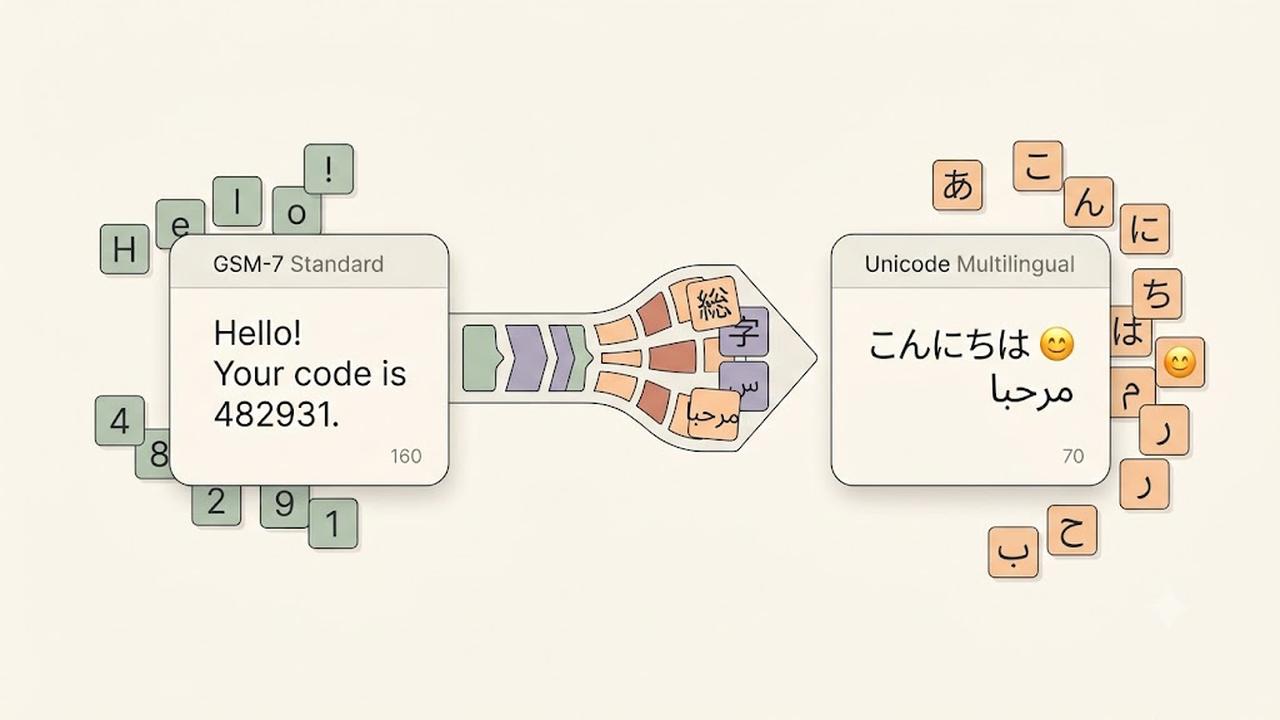
    GSM encoding, also called GSM-7, is the standard character set used for most SMS messages.

    It supports common characters such as:

    • English letters
    • Numbers
    • Basic punctuation
    • Common symbols

    A single GSM encoded SMS message supports up to 160 characters.

    Examples:

    Hello, your appointment is confirmed for tomorrow.
    
    Your verification code is 482931.
    

    Since these messages only contain GSM-supported characters, they can use the full SMS character limit.

    What Is Unicode SMS?

    Unicode SMS uses a broader character set that supports languages and symbols outside GSM encoding.

    Unicode allows messages to include:

    • Emojis
    • Non-Latin languages
    • Special symbols
    • International characters

    Examples include:

    • Chinese
    • Japanese
    • Arabic
    • Hindi
    • Emoji characters

    However, Unicode messages have a smaller character limit because each character requires more data.

    A single Unicode SMS message supports up to 70 characters.

    GSM vs Unicode SMS

    Although both formats deliver text messages, they have different limits.

    GSM EncodingUnicode SMS
    Supports standard charactersSupports global characters
    Up to 160 characters per SMSUp to 70 characters per SMS
    Smaller message sizeLarger message size
    Common for English messagesRequired for emojis and many languages

    Choosing the correct format helps prevent unexpected SMS segmentation.

    What Are SMS Segments?

    When a message exceeds the character limit, mobile networks split it into multiple SMS segments.

    For longer messages:

    • GSM messages usually allow 153 characters per segment.
    • Unicode messages usually allow 67 characters per segment.

    The recipient still sees one complete message, but multiple SMS segments may be used behind the scenes.

    Common Characters That Trigger Unicode SMS

    Some characters may automatically convert a message from GSM to Unicode.

    Examples include:

    • Emojis 😊
    • Curly quotation marks “ ”
    • Certain accented characters
    • Non-English alphabets
    • Special symbols

    Before sending large campaigns, always check whether your message uses Unicode characters.

    How to Reduce SMS Segments

    Businesses can optimize messages by following a few simple practices.

    We recommend:

    • Remove unnecessary emojis.
    • Replace special quotation marks with standard quotes.
    • Keep messages short and clear.
    • Test messages before sending campaigns.
    • Use SMS optimization tools when available.

    Additionally, reviewing message length before sending can help control costs.

    Does DialNext Support SMS Encoding Optimization?

    Yes. DialNext automatically manages SMS Encoding to help improve message compatibility and delivery.

    DialNext detects message formatting and helps businesses send reliable SMS conversations without manually handling encoding rules.

    This allows teams to focus on customer communication while reducing common formatting problems.

    Frequently Asked Questions

    Why Did My SMS Become Multiple Messages?

    Your SMS may become multiple segments if it exceeds character limits or contains Unicode characters such as emojis or unsupported symbols.

    Are Emojis Supported in SMS?

    Yes. Emojis are supported through Unicode SMS, but they reduce the number of characters available in each message segment.

    Should Businesses Avoid Unicode SMS?

    No. Unicode is important for global communication. However, businesses should understand how it affects message length and usage.

    Does GSM Encoding Support Every Language?

    No. GSM encoding supports a limited character set. Many international languages require Unicode.

    Related Articles

    Additional Resources

    Learn more about GSM SMS character encoding:

    https://www.unicode.org

    Need Help?

    If you have questions about SMS Encoding, message limits, or business messaging, contact us at help@dialnext.io.

  • What Is Carrier Filtering in Messaging?

    What Is Carrier Filtering in Messaging?

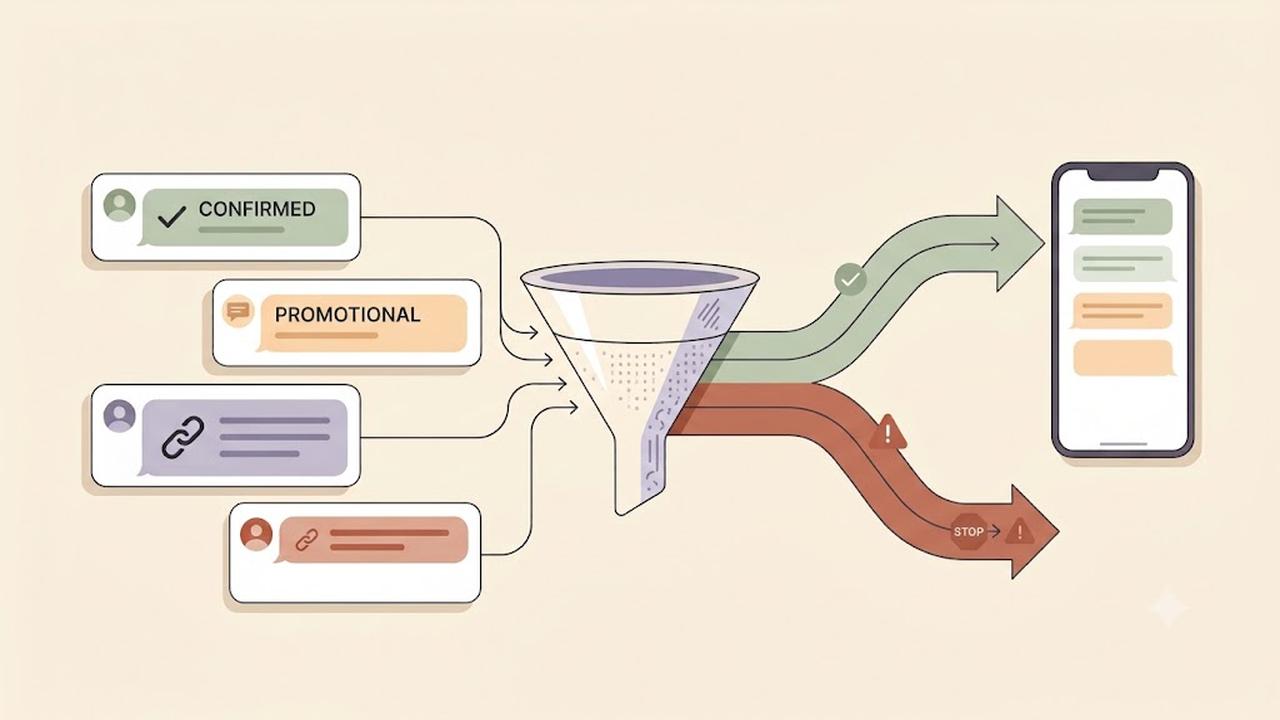
    Carrier Filtering is the process mobile carriers use to identify, review, and block messages that may violate messaging rules or appear suspicious. It helps protect users from spam, fraud, phishing, and unwanted text messages.

    Businesses that send SMS messages should understand how Carrier Filtering works because it can affect message delivery and customer communication.

    Why Does Carrier Filtering Happen?

    Mobile carriers process billions of messages every day. To protect recipients, carriers analyze messaging traffic and identify content that may be unwanted or harmful.

    Filtering systems help detect:

    • Spam messages
    • Fraud attempts
    • Phishing links
    • Unapproved marketing campaigns
    • High-risk message patterns
    • Policy violations

    Additionally, carriers use filtering systems to maintain trust across messaging networks.

    How Does Carrier Filtering Work?

    Carrier Filtering uses a combination of automated systems, compliance checks, and network rules to evaluate messages.

    Carriers may review several factors, including:

    • Message content
    • Sender reputation
    • Sending patterns
    • Message volume
    • Links included in messages
    • Recipient complaints
    • Registration status

    If a message triggers filtering rules, the carrier may block it before it reaches the recipient.

    Common Reasons Messages Get Filtered

    Messages can be filtered for many reasons.

    Common causes include:

    Missing Registration Requirements

    Some regions require businesses to register before sending application-to-person (A2P) messages.

    For example, businesses sending SMS messages to users in the United States often need approved A2P 10DLC registration.

    Suspicious Message Content

    Carriers may block messages containing:

    • Misleading information
    • Unclear sender identity
    • Suspicious links
    • Excessive capitalization
    • Unusual formatting

    Therefore, businesses should write clear and transparent messages.

    Public URL Shorteners

    Many carriers discourage public URL shorteners because bad actors frequently use them to hide unsafe destinations.

    Instead, use branded links whenever possible.

    Missing Opt-In Consent

    Recipients should agree to receive messages before a business contacts them.

    A clear opt-in process improves compliance and reduces filtering risk.

    High Complaint Rates

    If many recipients report messages as spam, carriers may reduce trust in future messages from the sender.

    Sending relevant messages only to interested users helps maintain a positive reputation.

    How to Reduce Carrier Filtering

    Although filtering decisions depend on carriers, businesses can follow best practices to improve SMS deliverability.

    We recommend:

    • Register required messaging campaigns
    • Collect proper customer consent
    • Clearly identify your business
    • Avoid misleading content
    • Use branded links
    • Provide opt-out instructions
    • Keep contact lists updated
    • Avoid sending unwanted messages

    Following these practices improves message reliability and customer trust.

    Carrier Filtering and A2P 10DLC

    A2P 10DLC registration helps carriers understand who is sending messages and why messages are being sent.

    Approved registration does not guarantee every SMS will be delivered. However, it helps establish sender legitimacy and reduces the chance of unnecessary filtering.

    Businesses should still follow messaging policies after approval.

    Does Carrier Filtering Mean My Message Failed?

    Not always.

    Some carriers provide filtering errors when a message is blocked, while others may silently filter messages based on their internal systems.

    Delivery behavior depends on:

    • Destination carrier
    • Country regulations
    • Sender reputation
    • Message content
    • Compliance requirements

    Does DialNext Prevent Carrier Filtering?

    DialNext helps businesses send reliable SMS messages by supporting proper messaging practices and compliance workflows.

    However, final delivery decisions are controlled by mobile carriers.

    To improve delivery rates, always follow carrier guidelines, maintain customer consent, and send relevant messages.

    Frequently Asked Questions

    Can Carrier Filtering Be Removed?

    No. Carrier filtering exists to protect users and messaging networks. Following best practices reduces the likelihood of legitimate messages being blocked.

    Why Are My SMS Messages Being Blocked?

    Messages may be blocked due to compliance issues, suspicious content, missing registration, or carrier filtering rules.

    Does A2P 10DLC Stop Carrier Filtering?

    No. A2P 10DLC improves sender verification but does not guarantee delivery of every message.

    Do All Carriers Use the Same Filtering Rules?

    No. Each carrier manages its own filtering systems, which means delivery behavior can vary between networks.

    Related Articles

    Additional Resources

    Learn more about messaging guidelines:

    https://www.ctia.org

    Need Help?

    If you have questions about SMS delivery, carrier filtering, or messaging compliance, contact us at help@dialnext.io.

  • What Is Caller ID?

    What Is Caller ID?

    Caller ID is a telephone service that displays the phone number of an incoming call before you answer it. Many business phone systems also display the caller’s name when that information is available.

    Businesses use Caller ID to identify incoming callers, improve customer interactions, and manage calls more efficiently.

    Why Is Caller ID Important?

    Without Caller ID, every incoming call would appear as an unknown number.

    Caller ID helps businesses and individuals quickly recognize callers before answering the phone.

    Using Caller ID offers several benefits:

    • Identify incoming callers
    • Improve customer service
    • Screen unwanted calls
    • Return missed calls more easily
    • Increase trust during business communications

    Additionally, Caller ID helps employees prepare for conversations before answering customer calls.

    How Does Caller ID Work?

    When someone places a call, the originating phone provider sends the caller’s phone number through the telephone network.

    The receiving carrier delivers that information to the recipient’s device before the call connects.

    If additional caller information is available, the recipient may also see the caller’s business or personal name.

    Although this process happens almost instantly, the information displayed depends on carrier support, device compatibility, and local telecommunications standards.

    What Information Does Caller ID Display?

    Caller ID can display:

    • Phone number
    • Business name (when available)
    • Personal name (when available)
    • Country or region (on some devices)

    The exact information varies depending on the receiving carrier and the recipient’s device.

    Caller ID vs CNAM

    Caller ID and CNAM are closely related, but they are not the same.

    Caller IDCNAM
    Displays the phone numberDisplays the caller’s name
    Available on most telephone networksPrimarily supported in North America
    Identifies the calling numberIdentifies the business or individual

    In many cases, recipients see both the phone number and the associated caller name together.

    Caller ID vs STIR/SHAKEN

    Caller ID identifies who is calling, while STIR/SHAKEN helps verify that the caller is authorized to use the displayed phone number.

    Together, these technologies improve trust in voice communications.

    • Caller ID displays the phone number.
    • CNAM displays the caller’s name.
    • STIR/SHAKEN authenticates the calling number.

    As a result, businesses can provide a more trustworthy calling experience.

    Why Does Caller ID Sometimes Show “Unknown”?

    Several factors can prevent Caller ID information from appearing correctly.

    Common reasons include:

    • Caller ID has been intentionally blocked.
    • The originating carrier does not provide caller information.
    • The receiving carrier does not support all Caller ID features.
    • The call originates from an unsupported network.
    • A temporary network issue prevents caller information from being delivered.

    Additionally, spam filtering systems may modify how caller information appears on some devices.

    Can Businesses Customize Caller ID?

    Yes. Many business phone providers allow organizations to configure the phone number displayed during outbound calls.

    Some providers also support CNAM registration, allowing a business name to appear alongside the phone number on supported networks.

    Availability depends on the phone number, carrier, and country.

    Does DialNext Support Caller ID?

    Yes. DialNext supports Caller ID for business communications.

    Caller ID behavior depends on your phone numbers, carrier capabilities, and regional telecommunications regulations.

    If you need help configuring outbound Caller ID, contact the DialNext support team.

    Frequently Asked Questions

    Does Caller ID Display My Business Name?

    Not always. Caller ID displays the phone number, while the business name is typically provided through CNAM on supported networks.

    Can I Hide My Caller ID?

    Some carriers allow callers to block their Caller ID information. Availability depends on your provider and local regulations.

    Does Caller ID Work Internationally?

    Caller ID works in many countries, although the information displayed varies by carrier, destination, and regional telecommunications standards.

    Does Caller ID Prevent Spam Calls?

    No. Caller ID identifies incoming callers but does not prevent spam calls. Technologies such as STIR/SHAKEN and carrier spam filtering help reduce fraudulent calls.

    Related Articles

    Additional Resources

    Learn more about caller identification and telecommunications standards:

    Need Help?

    If you have questions about Caller ID, CNAM, or business phone numbers, contact us at help@dialnext.io.

  • What Is CNAM?

    What Is CNAM?

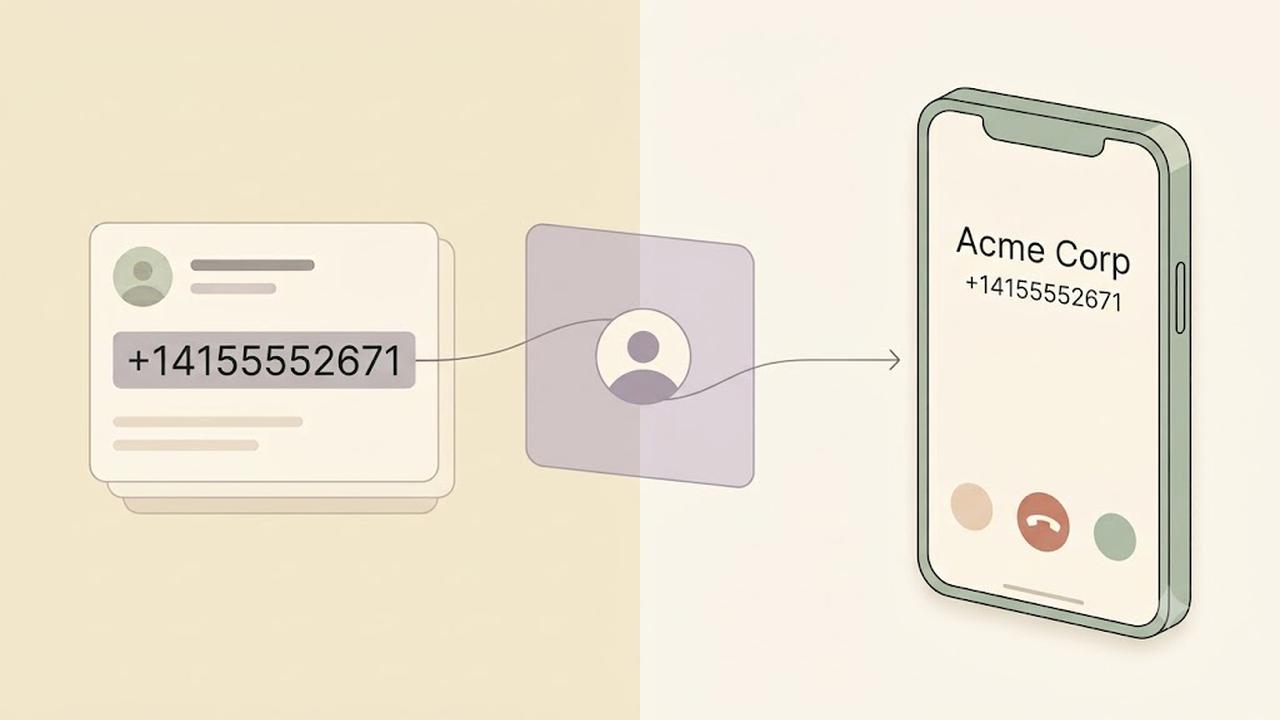
    CNAM (Caller ID Name) is a service that displays the caller’s name along with their phone number when placing a phone call. Businesses use CNAM to help customers recognize who is calling before answering the phone.

    A properly configured CNAM record can improve brand recognition, increase answer rates, and build trust with customers.

    Why Is CNAM Important?

    When customers receive calls from unknown numbers, they may choose not to answer.

    CNAM helps solve this problem by displaying your business name on supported caller ID devices.

    Using CNAM can help businesses:

    • Improve answer rates
    • Increase brand recognition
    • Build customer trust
    • Reduce confusion during inbound and outbound calls
    • Create a more professional calling experience

    Additionally, displaying a recognizable business name can make legitimate calls appear more trustworthy.

    How Does CNAM Work?

    When you place a phone call, your phone number is sent to the receiving carrier.

    The receiving carrier may perform a CNAM lookup to determine whether a caller name is associated with that phone number.

    If a CNAM record exists and the recipient’s carrier supports CNAM lookups, the business name may appear alongside the phone number.

    Although the process happens in seconds, the displayed caller name depends on the receiving carrier’s network and device capabilities.

    What Does a CNAM Record Look Like?

    A CNAM record typically contains:

    • Business name
    • Personal name (when applicable)
    • Up to 15 display characters in many North American networks

    Example:

    Phone NumberDisplayed CNAM
    +14155552671DialNext
    +12125551234ABC Plumbing
    +16175559876Smith Law

    Carrier limitations may affect how the caller name appears on different devices.

    Does Every Phone Display CNAM?

    No.

    CNAM support depends on several factors, including:

    • The receiving carrier
    • The recipient’s device
    • Regional telecommunications standards
    • Whether the carrier performs CNAM lookups

    Some mobile carriers display only the phone number, while others may show a verified business name or information from their own caller ID databases.

    CNAM vs Caller ID

    Although the terms are often used together, they refer to different things.

    Caller IDCNAM
    Displays the phone numberDisplays the caller’s name
    Available on most phone systemsDepends on carrier support
    Identifies the calling numberIdentifies the caller or business

    Together, Caller ID and CNAM help recipients identify incoming calls.

    CNAM vs STIR/SHAKEN

    CNAM and STIR/SHAKEN serve different purposes.

    • CNAM displays the caller’s name.
    • STIR/SHAKEN verifies that the caller is authorized to use the phone number.

    In other words, CNAM helps identify the caller, while STIR/SHAKEN helps authenticate the caller.

    Many businesses use both technologies to improve customer trust.

    How Do Businesses Register a CNAM?

    The registration process depends on your voice provider.

    In general, businesses must:

    1. Own or control the phone number.
    2. Submit the desired caller name.
    3. Wait for the provider to publish the CNAM record.
    4. Allow time for carrier databases to update.

    Propagation times vary between providers and carriers.

    Does DialNext Support CNAM?

    CNAM availability depends on the phone number, carrier, and country.

    If CNAM is supported for your phone number, DialNext can help you configure your caller ID name according to carrier requirements.

    Contact our support team if you need assistance with CNAM registration or caller ID configuration.

    Frequently Asked Questions

    Is CNAM Available Worldwide?

    No. CNAM is primarily supported in North America. Other countries often use different caller identification systems.

    Does CNAM Guarantee My Business Name Will Appear?

    No. The displayed caller name depends on the receiving carrier, recipient’s device, and local telecommunications infrastructure.

    How Long Does CNAM Registration Take?

    The processing time varies by provider and carrier. Updates may take several business days to appear across all networks.

    Can I Change My CNAM?

    Yes. Most providers allow businesses to update their caller ID name, although carrier processing times may vary.

    Related Articles

    Additional Resources

    Learn more about caller identification and telecommunications standards:

    Need Help?

    If you have questions about CNAM, caller ID, or business phone numbers, contact us at help@dialnext.io.