Blog

  • International Phone Numbers Available in 70+ Countries

    International Phone Numbers Available in 70+ Countries

    DialNext allows businesses to purchase international phone numbers in more than 70 countries worldwide.

    Whether you’re building a local presence in a new market, supporting international customers, or managing a global sales team, DialNext helps you make and receive calls using local business phone numbers from a single platform.

    Additionally, you can manage calls, SMS messaging where supported, CRM integrations, and team collaboration without switching between multiple providers.

    What Types of Phone Numbers Are Available?

    Depending on the country, DialNext may offer:

    • Local Numbers
    • Mobile Numbers
    • Toll-Free Numbers
    • National Numbers

    Number availability varies by country and local telecommunications regulations.

    Do I Need Documents to Purchase a Phone Number?

    Some countries require additional documentation before phone numbers can be activated.

    Requirements may include:

    • Business Registration Documents
    • Government-Issued Identification
    • Proof of Address
    • Local Presence Documentation

    If documentation is required, DialNext will guide you through the verification process during number purchase.

    Supported Countries

    North America

    NameNameName
    BarbadosCanadaCosta Rica
    Dominican RepublicEl SalvadorGrenada
    JamaicaMexicoPanama
    Puerto RicoUnited States

    Europe

    NameNameName
    AustriaBelgiumBosnia and Herzegovina
    BulgariaCroatiaCzech Republic
    DenmarkEstoniaFinland
    FranceGermanyGreece
    HungaryIcelandIreland
    Isle of ManItalyLithuania
    LuxembourgNetherlandsNorway
    PolandPortugalRomania
    SlovakiaSloveniaSpain
    SwitzerlandUnited Kingdom

    Asia

    NameNameName
    Hong KongIndiaIndonesia
    IsraelJordanMacao
    MalaysiaPhilippinesQatar
    Saudi ArabiaSingaporeSouth Korea
    Sri LankaTaiwanThailand
    United Arab EmiratesVietnam

    South America

    NameNameName
    ArgentinaBrazilChile
    ColombiaEcuadorPeru
    UruguayVenezuela

    Pacific

    NameName
    AustraliaNew Zealand

    Africa

    NameNameName
    BeninBotswanaEgypt
    GhanaKenyaMali
    MauritiusSouth AfricaTunisia
    Uganda

    Looking for a Country Not Listed?

    If your preferred country is not listed above, contact our support team. We regularly expand our global coverage and may be able to help with your requirements.

    Ready to Get Started?

    Purchase a local, mobile, or toll-free phone number directly from your DialNext account and start communicating with customers around the world.

    Related Articles

    • Phone Number Requirements
    • How to Purchase a Phone Number
    • A2P 10DLC Registration Guide
    • SMS Compliance Guide

    Need Help?

    If you have questions about number availability, documentation requirements, or international coverage, contact us at help@dialnext.io.

  • Why Was My A2P 10DLC Campaign Rejected?

    Why Was My A2P 10DLC Campaign Rejected?

    If your A2P 10DLC campaign registration was rejected, you must correct the identified issue before submitting a new registration request.

    Most A2P 10DLC campaign rejections occur because of incomplete business information, unclear opt-in processes, missing compliance documents, or sample messages that do not match the registered use case.

    This guide explains the most common rejection reasons and how to resolve them.

    Invalid Campaign Description

    Your campaign description should clearly explain:

    • What your business does
    • Who receives your messages
    • Why messages are sent
    • The type of messages being delivered

    Avoid vague descriptions such as:

    “Customer notifications”

    Instead, use a detailed description such as:

    “We send appointment reminders and follow-up notifications to customers who opt in through our website.”

    Additionally, if you are registering on behalf of customers as an ISV or software provider, mention that in the campaign description.

    Sample Messages Do Not Match the Use Case

    Sample messages must accurately reflect the messages you plan to send.

    For example, if you register a marketing campaign but provide authentication code examples, carriers may reject the campaign.

    Furthermore, at least one sample message should include your business or brand name.

    Sample messages should:

    • Match the selected campaign use case
    • Reflect actual customer communications
    • Include template placeholders when applicable
    • Clearly identify your brand

    Website Issues

    The website submitted during registration must:

    • Be publicly accessible
    • Match your business name
    • Clearly describe your products or services

    However, registrations are commonly rejected when:

    • The website is unavailable
    • The website is under construction
    • The website does not match the registered business
    • The website lacks business information

    If your website has not launched yet, clearly mention that in your campaign description.

    Missing Opt-In Information

    Carriers require proof that recipients consent to receive messages.

    Because of this, you should clearly explain:

    • How users provide consent
    • Where consent is collected
    • What messages users will receive
    • How frequently messages are sent

    Common opt-in methods include:

    • Website forms
    • Contact forms
    • Appointment booking forms
    • Customer signup pages
    • Paper consent forms

    If consent is collected through a website, ensure the website clearly displays SMS consent language.

    Missing Opt-Out Process

    Recipients must have a simple way to stop receiving messages.

    For example, many businesses support keywords such as:

    • STOP
    • UNSUBSCRIBE
    • CANCEL

    Additionally, your registration should explain:

    • Supported opt-out keywords
    • Confirmation messages sent after opt-out
    • How future messages are prevented

    We recommend including language such as:

    “Reply STOP to unsubscribe.”

    Missing Privacy Policy or Terms of Service

    Many A2P 10DLC campaign rejections occur because required compliance documents cannot be verified.

    Your website should provide:

    • A publicly accessible Privacy Policy
    • A publicly accessible Terms of Service page

    In addition, include direct links to these pages when completing your registration.

    Common Compliance Mistakes

    Before submitting your campaign, review the following:

    • Using public URL shorteners in sample messages
    • Submitting incomplete websites
    • Providing inaccurate business information
    • Registering one use case while describing another
    • Missing opt-in disclosures
    • Missing opt-out instructions
    • Sharing SMS consent with third parties

    As a result, even small inconsistencies can delay approval.

    Prohibited Messaging Categories

    Some campaign types cannot be approved regardless of registration quality.

    Examples include:

    • Illegal substances
    • Gambling
    • Phishing
    • Fraudulent marketing
    • Debt relief schemes
    • Unauthorized lead generation
    • High-risk financial promotions

    If your use case falls into a prohibited category, carriers may permanently reject the registration.

    Before You Resubmit

    Before creating a new A2P 10DLC campaign registration request, verify the following:

    ✓ Business information matches official records

    ✓ Website is publicly accessible

    ✓ Privacy Policy is available

    ✓ Terms of Service is available

    ✓ Sample messages match the use case

    ✓ Opt-in process is clearly documented

    ✓ Opt-out process is clearly documented

    ✓ Brand name appears in sample messages

    Completing this checklist can significantly improve your approval chances.

    Related Articles

    • A2P 10DLC Registration Guide
    • SMS Compliance Guide
    • SMS Segment Optimization

    Additional Resources

    Learn more about A2P registration requirements from The Campaign Registry:

    https://www.campaignregistry.com/

    You can also review messaging compliance guidelines from CTIA:

    https://www.ctia.org

    Need Help?

    If you need assistance reviewing your A2P 10DLC campaign before resubmission, contact help@dialnext.io.

  • A2P 10DLC Registration Guide

    A2P 10DLC Registration Guide

    If your business sends SMS or MMS messages to US phone numbers using local 10-digit phone numbers, you must complete A2P 10DLC registration before sending messages.

    Without an approved registration, carriers may block your messages or limit delivery.

    What is A2P 10DLC?

    A2P 10DLC stands for Application-to-Person 10-Digit Long Code.

    It is the registration framework used by US mobile carriers for business messaging sent through local 10-digit phone numbers.

    The goal is to improve message deliverability, reduce spam, and help carriers verify who is sending messages.

    Who Needs A2P 10DLC Registration?

    You need A2P 10DLC registration if:

    • You send SMS or MMS messages to US phone numbers.
    • You use local US long code numbers.
    • You send business, support, notification, marketing, or transactional messages.

    If you do not send messages to US phone numbers, no action is required.

    How A2P 10DLC Registration Works

    There are two required steps:

    1. Brand Registration

    Brand registration identifies your business.

    Information commonly required includes:

    • Legal business name
    • Business address
    • Tax ID or EIN
    • Business website
    • Company type

    2. Campaign Registration

    Campaign registration identifies the type of messages you send.

    Examples include:

    • Customer care
    • Appointment reminders
    • Account notifications
    • Marketing messages
    • Two-factor authentication

    Each messaging use case must match the campaign you register.

    Information Required for Registration

    Before starting registration, prepare:

    • Legal business name
    • Tax ID or EIN
    • Business website
    • Business address
    • Contact information
    • Sample SMS messages
    • Opt-in process details
    • Privacy Policy URL
    • Terms of Service URL

    Common Reasons for Rejection

    Campaigns are commonly rejected when:

    • Business information does not match official records.
    • Sample messages do not match the declared use case.
    • The website is incomplete or unavailable.
    • Consumer consent is not clearly documented.
    • Privacy Policy or Terms of Service pages are missing.
    • Opt-in and opt-out instructions are unclear.

    Best Practices

    To improve approval rates:

    • Use your legal business name exactly as registered.
    • Make sure your website is publicly accessible.
    • Clearly explain how users consent to receive messages.
    • Include STOP instructions in your messaging program.
    • Maintain Privacy Policy and Terms of Service pages.
    • Ensure sample messages accurately represent your use case.

    Frequently Asked Questions

    Do I need new phone numbers?

    No. Existing US local numbers can usually be associated with an approved campaign.

    Does A2P 10DLC affect WhatsApp?

    No. A2P 10DLC only applies to carrier-based SMS and MMS messaging.

    Does A2P 10DLC apply outside the United States?

    A2P 10DLC primarily applies to messaging sent to US recipients using US local numbers.

    What happens if I don’t register?

    Messages may be blocked, filtered, or experience reduced deliverability.

    Need Help?

    If you need assistance with A2P 10DLC registration, contact help@dialnext.io.

    Related Articles

    Additional Resources

    For the latest carrier registration requirements, review The Campaign Registry .

    You can also review messaging best practices from CTIA .

  • SMS Segment Optimization with Smart Encoding | DialNext

    SMS Segment Optimization with Smart Encoding | DialNext

    SMS Segment Optimization helps reduce SMS costs by minimizing the number of message segments required for delivery. DialNext automatically applies Smart Encoding to outgoing SMS messages to optimize segment usage and improve message efficiency.

    How SMS Segment Optimization Works

    SMS messages can be sent using different character encodings.

    Messages containing standard GSM characters can fit up to 160 characters in a single SMS segment. However, certain special characters and Unicode symbols reduce the character limit and may increase the number of SMS segments required to send the message.

    To help optimize message delivery and costs, DialNext automatically replaces common Unicode characters with GSM-compatible alternatives before sending the message.

    Examples

    Original CharacterReplaced With
    “ ”
    ‘ ’

    For example:

    Hello “John”
    

    will be automatically converted to:

    Hello "John"
    

    before the message is sent.

    Benefits of SMS Segment Optimization

    • Reduce SMS segment count
    • Lower SMS delivery costs
    • Improve compatibility across carriers and devices
    • No manual action required

    Is Smart Encoding enabled by default?

    Yes. Smart Encoding is automatically applied to SMS messages sent from the DialNext Inbox.

    No additional configuration is required.

    SMS Segment Optimization FAQs

    Will Smart Encoding change the meaning of my message?

    No. Smart Encoding only replaces special characters with equivalent GSM-compatible characters while preserving the original message content.

    Why does SMS segment count matter?

    SMS providers bill messages based on the number of segments used. Messages containing Unicode characters may require more segments than messages using standard GSM characters.

    Can I disable Smart Encoding?

    Smart Encoding is automatically applied by DialNext to help optimize message delivery and costs.

    Need Help?

    If you have any questions about SMS delivery or message encoding, contact us at help@dialnext.io.
    How SMS Pricing Works

    SMS Character Limits

    SMS Deliverability Best Practices

    GSM 03.38 character set

  • How to integrate with Pipedrive?

    How to integrate with Pipedrive?

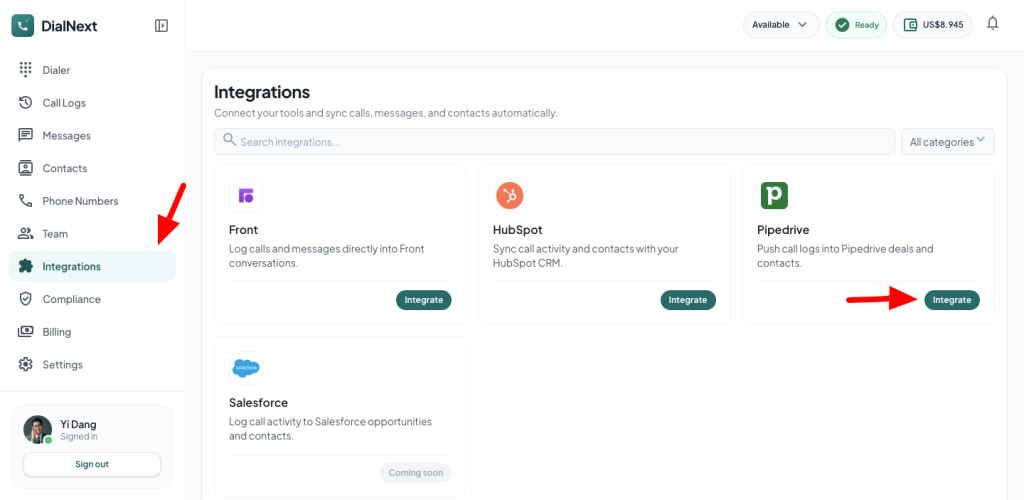
    • Login or Signup to your DialNext account.
    • In the left sidebar, click Integrations.
    • Look for Pipedrive & click the Integrate button.
    • You will be redirected to Pipedrive’s authorization page. Click Authorize to grant permission and connect DialNext with Pipedrive.
    • Once the authorization is complete, Pipedrive will redirect you back to DialNext.
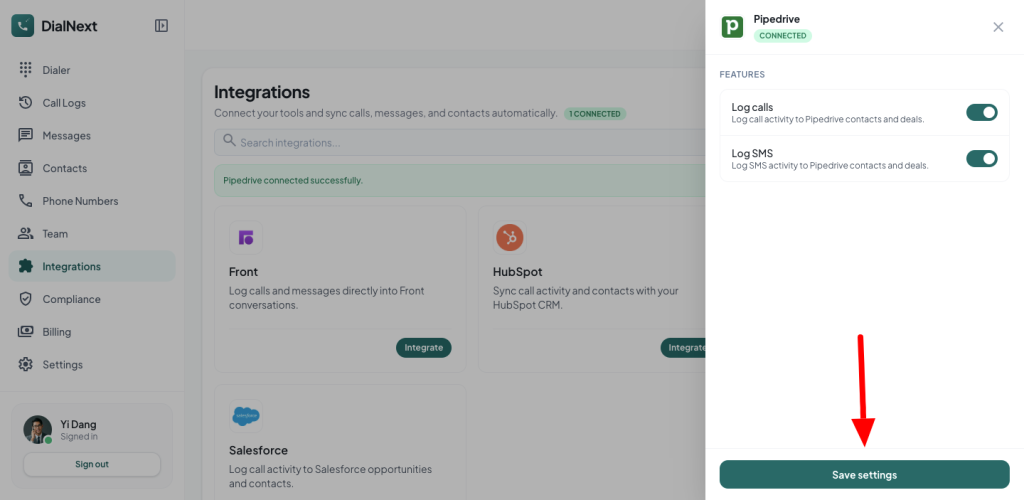
    • Click Save Settings to begin logging calls and SMS messages to your Pipedrive account.
    • Make a test call, and you will see a log automatically created within the corresponding contact in Pipedrive.
    • If you encounter any issue, you can reach us out on help@dialnext.io

  • How to integrate with HubSpot?

    How to integrate with HubSpot?

    • Login or Signup to your DialNext account.
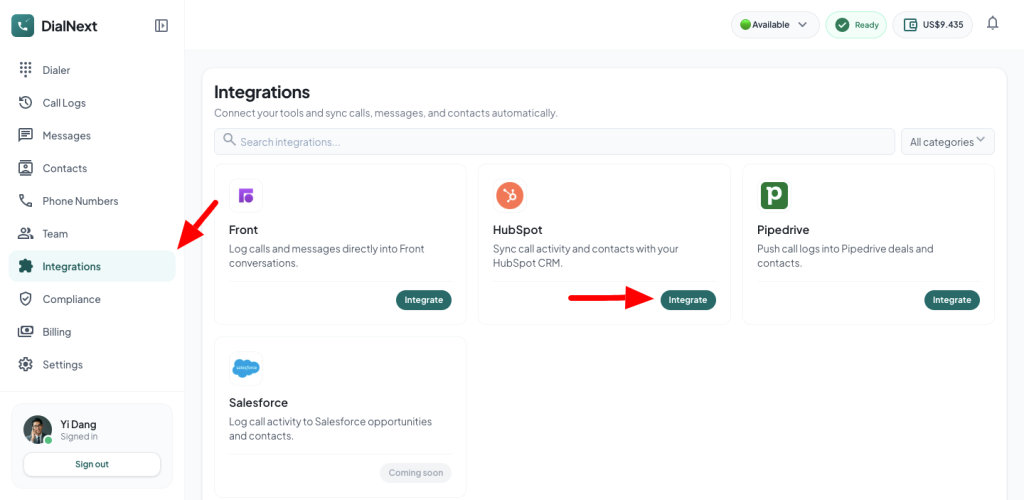
    • In the left sidebar, click Integrations.
    • Look for HubSpot & click the Integrate button.
    • You will be redirected to HubSpot’s authorization page. Click Authorize to grant permission and connect DialNext with HubSpot.
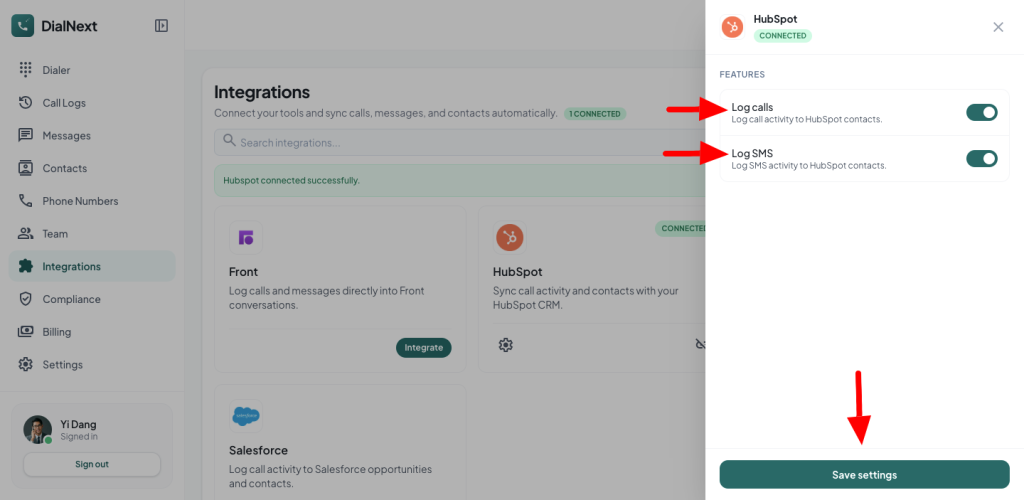
    • Once the authorization is complete, HubSpot will redirect you back to DialNext.
    • Click Save Settings to begin logging calls and SMS messages to your HubSpot account.
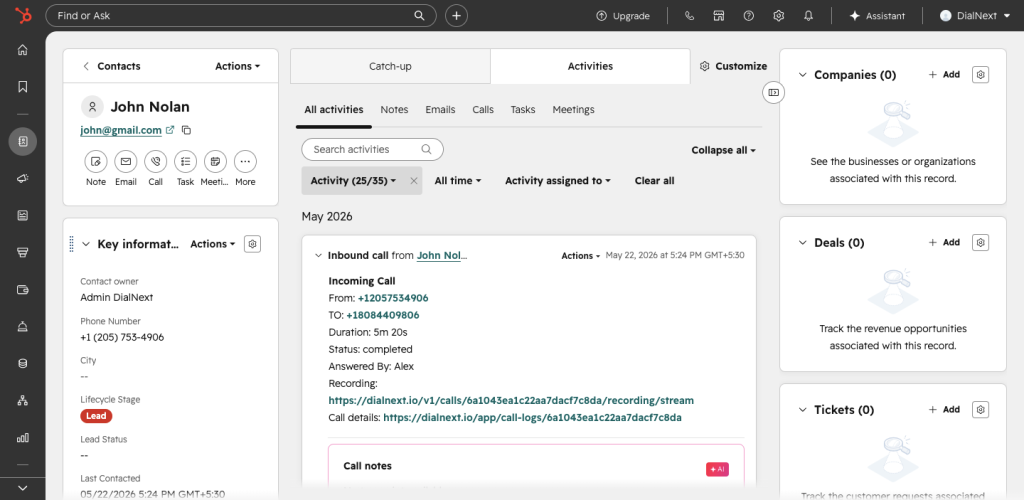
    • Make a test call, and you will see a log automatically created within the corresponding contact in HubSpot.

    If you encounter any issue, you can reach us out on help@dialnext.io

  • How to integrate with Front?

    How to integrate with Front?

    • Login or Signup to your DialNext account.
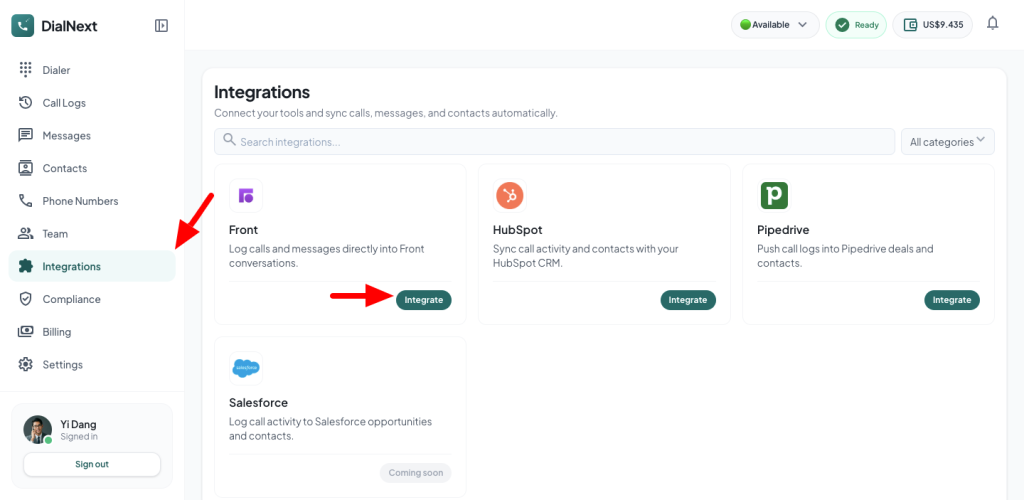
    • In the left sidebar, click Integrations.
    • Look for Front & click the Integrate button.
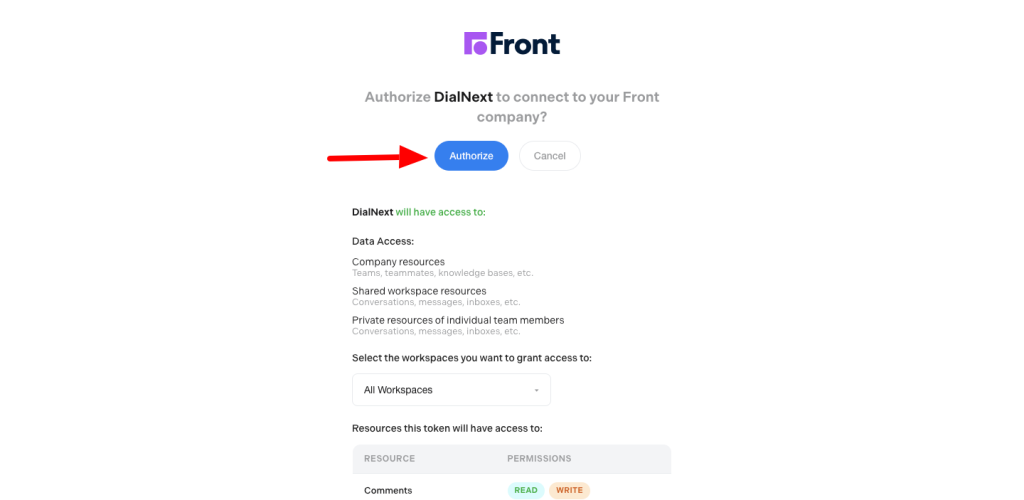
    • You will be redirected to Front’s authorization page. Click Authorize to grant permission and connect DialNext with Front.
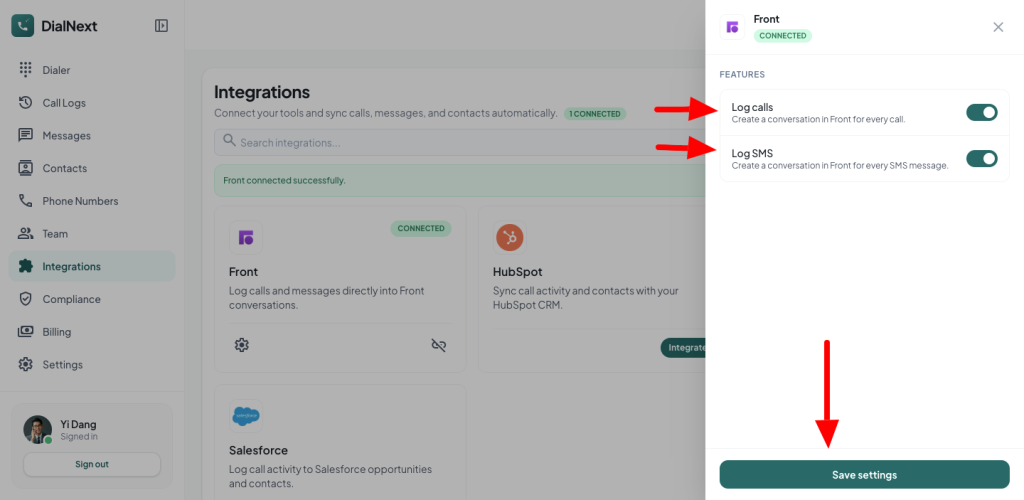
    • Once the authorization is complete, Front will redirect you back to DialNext.
    • Click Save Settings to begin logging calls and SMS messages to your Front account.
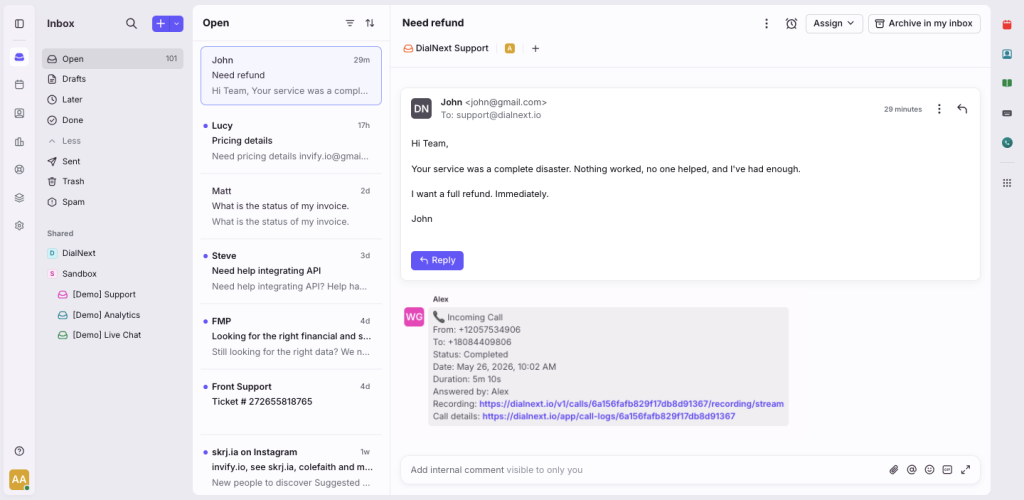
    • Make a test call, and you will see a log automatically created within the corresponding conversation in Front.

    If you encounter any issue, you can reach us out on help@dialnext.io